6 Best All-in-One Laser Printers for Home Use (October 2026)
The best all-in-one laser printers for home use include the Brother DCP-L2640DW for a home office that prints, copies and scans, the Brother HL-L2480DW for scanning books from a flatbed glass, and the Brother MFC-L2820DW for fax and a touchscreen.
On this page (13 sections)
- How we picked these six all-in-one laser printers
- The 6 best all-in-one laser printers for home use in detail
- Copy, scan and fax: which features you need
- Toner and supplies for an all-in-one laser printer
- Paper trays and feeders on an all-in-one laser printer
- Size and placement for an all-in-one on a home desk
- Which all-in-one laser printer fits your home
- Questions to ask before you buy an all-in-one laser printer
- Which all-in-one suits a shared home office
- Warranty and support on an all-in-one
- Setting up an all-in-one at home
- Common mistakes with an all-in-one
- Which all-in-one laser printer to buy
The Brother DCP-L2640DW is the best all-in-one laser printer for home use, because it prints, copies and scans and it prints on both sides on its own. If you also send faxes, the MFC-L2820DW adds a fax line and a touchscreen.
An all-in-one saves a second machine in a home office. The four things to check are copy and scan, fax, two-sided printing and how much desk space the body takes up.
Our picks at a glance
-
1

-
2

-
3

How we picked these six all-in-one laser printers
We compared the specs of each model, including the functions, two-sided printing and connections. We also checked what each maker says about its toner and its setup.
Our score weighs specs, features and buyer feedback against what you're shopping for. The scores run from 7.3 to 8.6, with the top of the list going to the Brothers that copy, scan and print on both sides.
| Product | Best for | Functions | Two-sided printing | Connectivity | Our score |
|---|---|---|---|---|---|
| Brother DCP-L2640DW | a home office that prints, copies and scans | Print, copy, scan | Automatic | Wi-Fi, Ethernet, USB | 8.6 |
| Brother HL-L2480DW | scanning books from a flatbed glass | Print, copy, scan | Automatic | Wi-Fi, Ethernet, USB | 8.2 |
| Brother MFC-L2820DW | fax and a touchscreen | Print, copy, scan, fax | Automatic | Wi-Fi, Ethernet, USB | 7.9 |
| Canon imageCLASS MF462dw II | a fast all-in-one with an expandable tray | Print, copy, scan, fax | Automatic | Wi-Fi, USB | 7.7 |
| HP LaserJet MFP M235sdw | a small office with Ethernet | Print, copy, scan | Automatic | Wi-Fi, Ethernet, USB | 7.6 |
| HP LaserJet MFP M140w | a compact all-in-one on a small desk | Print, copy, scan | None | Wi-Fi, USB | 7.3 |
The 6 best all-in-one laser printers for home use in detail
Each card below gives the key facts for one model, followed by our notes on who it suits. Badges and scores match the picks list above.
Brother DCP-L2640DW
- Print, copy and scan
- Automatic two-sided printing
- 50-page automatic document feeder
- Dual-band Wi-Fi and Ethernet
The DCP-L2640DW puts print, copy and scan in one body, with a feeder for multi-page originals. It's the most complete all-in-one here for a home office.
Pros
- Prints, copies and scans
- 50-page automatic document feeder
- Automatic two-sided printing
Cons
- No fax
- 25 pounds, so it needs a steady shelf
The DCP-L2640DW is the one to buy when a single desk machine has to print, copy and scan. Brother rates it at 36 pages per minute in black and white, and it prints on both sides on its own.
The 50-page automatic document feeder handles multi-page originals for copying and scanning. Dual-band Wi-Fi and Ethernet connect it to a network, and Brother's Mobile Connect app prints and checks toner from a phone.
It has no fax line, so it can't send faxes. If you still send them, the MFC-L2820DW below does the job.
Brother HL-L2480DW
- Flatbed scan glass
- 2.7-inch touchscreen
- Automatic two-sided printing
- Copy and scan, no fax
The HL-L2480DW copies and scans from a flatbed glass, which suits books and single sheets. It's a compact copy and scan printer for a small desk.
Pros
- Flatbed glass for books
- Touchscreen with cloud scan apps
- Automatic two-sided printing
Cons
- No automatic document feeder
- No fax
The HL-L2480DW copies and scans, and its flatbed glass is the reason to pick it. It suits books, old papers and single sheets that a feeder can't handle well.
It prints at 36 pages per minute in black and white, with automatic two-sided printing. The 2.7-inch touchscreen gives you copy and scan settings and cloud scan destinations.
A flatbed takes longer than a feeder for long stacks. If stacks are most of your copying, the DCP-L2640DW is the better fit.
Brother MFC-L2820DW
- Copy, scan and fax
- 2.7-inch touchscreen
- 50-page automatic document feeder
- Automatic two-sided printing
The MFC-L2820DW is the Brother all-in-one for a home that still sends faxes. Its touchscreen makes copy, scan and cloud jobs quicker to set up.
Pros
- Fax included
- 2.7-inch touchscreen
- Cloud scan to apps such as Google Drive and Dropbox
Cons
- 22.5 pounds, so it needs a sturdy shelf
- Fax needs a phone line
The MFC-L2820DW is the Brother all-in-one for a home that still sends faxes. It copies, scans and faxes, and it has a 2.7-inch touchscreen for copy and scan settings.
The 50-page feeder and automatic two-sided printing make it quick on multi-page jobs. From the touchscreen you can scan to cloud apps such as Google Drive, Dropbox and Evernote.
It weighs 22.5 pounds and uses the TN830 or TN830XL toner. Brother offers its Refresh EZ Print subscription on this model, so decide whether you want it before you sign up.
Canon imageCLASS MF462dw II
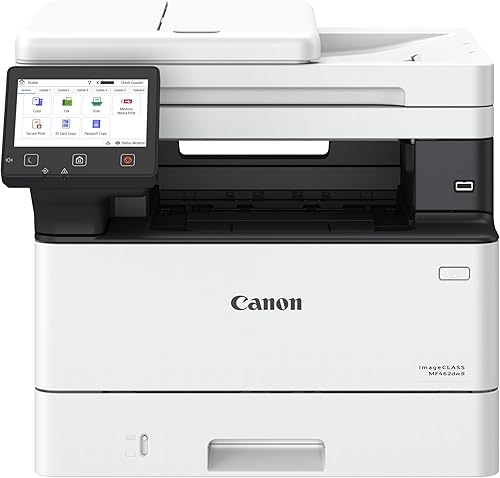
- Print, scan, copy and fax
- Up to 37 pages per minute
- Automatic two-sided printing
- Optional 550-sheet cassette
The MF462dw II is a fast, four-function black and white printer with a 5-inch color touchscreen. Its paper tray can grow with an optional cassette.
Pros
- Fax, copy, scan and print
- Up to 37 pages per minute
- Expandable paper capacity
Cons
- 46.6 pounds, the heaviest model here
- Needs a large, stable desk
The MF462dw II is the fast all-in-one here. Canon rates it at up to 37 pages per minute, and it prints, scans, copies and faxes.
The 250-sheet cassette and 100-sheet multipurpose tray hold a good stack of paper. An optional cassette adds 550 more sheets, which suits a busy home office.
At 46.6 pounds it's the heaviest model in this guide, so plan a sturdy desk and help to move it. Canon uses Canon Genuine Toner 070 in this model.
HP LaserJet MFP M235sdw

- Print, scan and copy
- Automatic two-sided printing
- Dual-band Wi-Fi with self-reset
- Ethernet included
HP describes the M235sdw for one to five people, and it includes Ethernet along with Wi-Fi. It's a practical all-in-one for a shared home office.
Pros
- Ethernet and dual-band Wi-Fi
- Automatic two-sided printing
- Built-in security features, per HP
Cons
- Weighs 21 pounds
- No fax
HP describes the LaserJet M235sdw for one to five people, which fits a small home office. It prints, scans and copies, with automatic two-sided printing.
It has dual-band Wi-Fi with self-reset, and Ethernet is included. HP also lists built-in security features that help protect the printer.
It weighs 21 pounds and has no fax. If you need a wired network connection, Ethernet is the reason to choose it over the Wi-Fi only models.
HP LaserJet MFP M140w

- Print, scan and copy
- One-sided printing only
- Wireless with self-reset
- HP Smart app
HP calls the M140w the smallest laser in its class, and it copies and scans in a compact body. It prints one side only, so it suits light household use.
Pros
- Compact body for a small desk
- Copy, scan and print
- Wireless printing from phones
Cons
- One-sided printing only
- HP says it blocks cartridges without HP chips
HP calls the M140w the smallest laser in its class, and it copies and scans in a compact body. It's a good fit for a small desk or a shared room.
It prints one side only, so two-sided jobs need a hand flip. HP says the M140w works only with cartridges that have HP chips and blocks the rest.
It weighs 11.9 pounds and prints wirelessly from phones and computers. For light household use, it covers copy, scan and print in one small unit.
Copy, scan and fax: which features you need
Start with the jobs you do most often. If you copy and scan forms at home, the DCP-L2640DW covers that, and it doesn't need a fax line.
Fax matters only if you still send faxes. The MFC-L2820DW and the MF462dw II include fax, and the others here don't.
For the mono picks without copy or scan, see our black and white laser printer guide.
Toner and supplies for an all-in-one laser printer
An all-in-one uses toner for every print, copy and fax, so cartridge costs add up. Brother's TN830 and TN830XL cartridges cover the DCP-L2640DW, MFC-L2820DW and HL-L2480DW, and Canon uses its own 070 and 075 toner for its models.
Brother rates the TN830XL at up to 3,000 pages, and the standard TN830 at up to 1,200. For the cartridge codes in detail, see our Brother laser printer toner guide.
HP says the M140w blocks cartridges without HP chips. Check that rule before you buy any non-HP cartridge.
Paper trays and feeders on an all-in-one laser printer
A document feeder matters most when you copy or scan many pages at once. The DCP-L2640DW and MFC-L2820DW both have 50-page feeders, which handle a stack without you feeding each sheet.
A flatbed glass suits books, photos and single pages, but it works one sheet at a time. The HL-L2480DW relies on its flatbed glass for copying, so it's slower on stacks than a feeder model.
For paper handling, the MF462dw II has the most capacity. It holds 250 sheets in the cassette, 100 in the multipurpose tray and up to 550 more with the optional cassette.
Size and placement for an all-in-one on a home desk
The all-in-ones here are not small. The DCP-L2640DW, MFC-L2820DW and HL-L2480DW are about 16 inches wide, and the MF462dw II is about 16.6 inches wide and 18 inches deep.
The M140w is the smallest model here, at about 14 inches wide. If your desk is narrow, measure the width and the depth before you order.
If Wi-Fi is your main concern, our wireless laser printer guide covers the wireless-only picks, and our best laser printer for home use guide shows where all-in-ones fit overall.
Leave room behind and above the unit for the lid to open and the paper to feed out. A stable shelf matters more than people expect, since most of these models weigh more than 20 pounds.
Which all-in-one laser printer fits your home
An all-in-one laser printer for a home office
The DCP-L2640DW is the most complete choice for a home office that prints, copies and scans. It prints on both sides automatically, so reports and forms stay quick.
An all-in-one laser printer that also faxes
The MFC-L2820DW is the Brother to pick if fax still matters. It has a touchscreen and a 50-page feeder, and it adds the fax line.
An all-in-one laser printer for a small desk
The HP LaserJet MFP M140w is the compact choice here. It copies and scans in a small body, and it prints one side only.
Questions to ask before you buy an all-in-one laser printer
Ask whether you need fax at all. A fax line is one of the few features that changes the choice between two otherwise similar Brother models.
Ask how often you copy many pages. A feeder earns its place if you do, and a flatbed is enough for occasional books and single pages.
Check the toner before you buy. The cartridge sets the cost per page, and it's the part you buy again.
Which all-in-one suits a shared home office
A shared office needs a machine that handles several users without a queue. The DCP-L2640DW and MFC-L2820DW both print from phones and laptops over Wi-Fi, so several people can send jobs from their own desks.
Check the touchscreen and the feeder on any model you share. A feeder and a touchscreen save time when several people use the same copy and scan settings.
For the full feature checklist, read our all-in-one laser printer buying guide.
Warranty and support on an all-in-one
Warranty terms vary by brand and model, so read the card in the box before you register. Keep the receipt with the model number for any claim.
Brother lists a 1-year limited warranty on the DCP-L2640DW, HL-L2480DW and MFC-L2820DW, with online, phone and live chat support for the life of the printer. Canon and HP set their own terms for the MF462dw II, M235sdw and M140w, so confirm them before you buy.
Setting up an all-in-one at home
Place the printer where the paper and output trays have room to open. Remove the packing material and protective tape before you power on.
Install the toner cartridges as the manual shows, then connect to Wi-Fi from the touchscreen or the maker's app. Print a test page and make a copy to confirm both functions work.
If you scan, set a default scan destination on your computer or phone. That one step saves time on every scan after it.
Common mistakes with an all-in-one
The most common mistake is paying for fax you won't use. If you don't send faxes, the fax line adds cost with no return.
Another is skipping the feeder check. If you copy stacks of pages, a feeder saves more time than a faster print speed.
A third is ignoring the toner. An all-in-one uses toner for copies and scans as well as prints, so the cartridge yield matters more than on a print-only model.
A fourth is buying a tray that's too small for your jobs. A small tray means refills in the middle of a long copy run, so match the tray to the largest job you do.
Which all-in-one laser printer to buy
Buy the DCP-L2640DW if you want one all-in-one laser printer for home use that prints, copies and scans. Buy the MFC-L2820DW if fax still matters to you.
Pick the HL-L2480DW for a flatbed glass, the MF462dw II for speed and capacity, or the M140w for a small desk. Each model here does the core job, so the right choice depends on the copy, fax and space needs you have now.
Our top 3 picks at a glance
-
1
-
2
-
3
Frequently asked questions
What is the best all-in-one laser printer for home use?
For most homes, the Brother DCP-L2640DW is the best pick. It prints, copies and scans, prints on both sides automatically and has a 50-page document feeder for multi-page originals.
Do I need fax on an all-in-one laser printer?
Only if you still send faxes. The Brother MFC-L2820DW adds fax and a touchscreen, while the DCP-L2640DW and HL-L2480DW copy and scan without fax.
Is an all-in-one laser printer hard to set up on Wi-Fi?
Most models walk you through a Wi-Fi setup on the touchscreen or through the printer's app. Keep your router's name and password handy, and place the printer close enough to the router for a steady signal.


