6 Best Wireless Laser Printers for Home (October 2026)
The best wireless laser printers for home include the Brother HL-L2460DW for wireless printing with two-sided pages, the Brother DCP-L2640DW for a wireless home office that also copies, and the Brother HL-L2405W for printing from phones on a home network.
On this page (16 sections)
- How we picked these six wireless laser printers
- The 6 best wireless laser printers in detail
- HL-L2460DW or DCP-L2640DW: which wireless Brother to buy
- Wi-Fi setup and placement for a wireless laser printer
- Phone printing apps for a wireless laser printer
- Two-sided wireless printing saves paper
- Which wireless laser printer fits your home
- Questions to ask before you buy a wireless laser printer
- Warranty and support for a wireless laser printer
- Setting up Wi-Fi on a wireless laser printer
- Network security for a home wireless printer
- Common mistakes with a wireless laser printer
- Ethernet as a wired backup for a wireless printer
- Matching the printer to the room
- Printing from a laptop without the app
- Which wireless laser printer to buy
The Brother HL-L2460DW is the best wireless laser printer for home, because it connects over dual-band Wi-Fi and Ethernet and prints on both sides at 36 pages a minute. If you also copy and scan, the Brother DCP-L2640DW adds a feeder on the same network.
A wireless printer lets every device in the house print to one machine. The things to check are the Wi-Fi band, the phone app, two-sided printing and whether you also want copy and scan.
Our picks at a glance
-
1

-
2

-
3

How we picked these six wireless laser printers
We compared the specs of each model, starting with the connections. Dual-band Wi-Fi, an Ethernet port and the phone app came first, because they decide how the printer fits your home network.
Our score weighs specs, features and buyer feedback against what you're shopping for. The scores run from 6.9 to 8.8, with automatic two-sided printing and a full set of connections at the top.
| Product | Best for | Functions | Two-sided printing | Connectivity | Our score |
|---|---|---|---|---|---|
| Brother HL-L2460DW | wireless printing with two-sided pages | Print only | Automatic | Wi-Fi, Ethernet, USB | 8.8 |
| Brother DCP-L2640DW | a wireless home office that also copies | Print, copy, scan | Automatic | Wi-Fi, Ethernet, USB | 8.6 |
| Brother HL-L2405W | printing from phones on a home network | Print only | Manual | Wi-Fi, USB | 8.2 |
| HP LaserJet M207dw | fast two-sided printing on Wi-Fi | Print only | Automatic | Wi-Fi, Ethernet, USB | 7.8 |
| Canon imageCLASS LBP122dw | printing on the go with Canon's app | Print only | Automatic | Wi-Fi, Ethernet | 7.7 |
| Canon imageCLASS LBP6030w | budget wireless pick for light printing | Print only | None | Wi-Fi, USB | 6.9 |
The 6 best wireless laser printers in detail
Each card below gives the key facts for one model, followed by our notes on who it suits. Badges and scores match the picks list above.
Brother HL-L2460DW
- Dual-band Wi-Fi, Ethernet and USB
- Automatic two-sided printing
- 250-sheet paper tray
- Brother Mobile Connect app
The HL-L2460DW is a print-only wireless printer with automatic two-sided printing. It's the right pick when you print from several devices and never copy.
Pros
- Dual-band Wi-Fi
- Automatic two-sided printing
- 36 pages per minute in black and white
Cons
- No copy or scan
- Brother's optional Refresh trial needs a monthly plan
The HL-L2460DW is the top wireless pick here. It's print only, with dual-band Wi-Fi at 2.4 and 5 GHz and Ethernet and USB as wired options.
Brother rates it at 36 pages per minute, and automatic two-sided printing saves paper on reports. The 250-sheet tray and manual feed slot cover most home jobs.
Brother lists an optional Refresh trial with this model. Read the trial terms before you start, since Brother says the trial needs enrollment in a plan that bills monthly until you cancel.
Brother DCP-L2640DW
- Dual-band Wi-Fi, Ethernet and USB
- Brother Mobile Connect app
- Automatic two-sided printing
- 50-page automatic document feeder
The DCP-L2640DW is the most complete wireless unit here. It prints from phones and computers, and it copies and scans from the same body.
Pros
- Dual-band Wi-Fi and Ethernet
- Prints, copies and scans
- Brother Mobile Connect app
Cons
- No fax
- 25 pounds
The DCP-L2640DW is the wireless model here that does the most. Brother rates it at 36 pages per minute in black and white, and it prints on both sides on its own.
It connects over dual-band Wi-Fi at 2.4 and 5 GHz, and it adds an Ethernet port and a USB port. The Brother Mobile Connect app prints and checks toner from a phone.
It weighs 25 pounds and has no fax. If you still send faxes, our all-in-one laser printer guide covers the Brother models that include it.
Brother HL-L2405W
- Dual-band Wi-Fi
- Mobile printing with Brother's app
- 250-sheet paper tray
- Manual two-sided printing
The HL-L2405W is a wireless print-only printer for a home that prints one side most days. Two-sided jobs need the paper flipped by hand.
Pros
- Dual-band Wi-Fi
- Mobile printing from phones
- 250-sheet tray
Cons
- Two-sided printing is manual
- No copy or scan
The HL-L2405W is the wireless printer for a home that prints one side of a page most days. It connects over dual-band Wi-Fi, and Brother's app prints from a phone.
Two-sided jobs need the paper flipped by hand, which is slower than an automatic duplex unit. Brother rates it at 30 pages per minute for one-sided printing.
It weighs 15.1 pounds, and Brother lists an optional Refresh trial with it. For the cheaper one-sided choices, see our best budget laser printer guide.
HP LaserJet M207dw

- Dual-band Wi-Fi with self-reset
- Ethernet included
- Automatic two-sided printing
- Works with AirPrint, Android and Chromebook, per HP
The M207dw is a compact wireless printer that prints on both sides automatically. HP describes it for one to five people.
Pros
- Wi-Fi with self-reset
- Automatic two-sided printing
- Ethernet included
Cons
- Print only
- 28 pages per minute on one side, per HP
The M207dw is the wireless printer here for fast two-sided jobs. HP rates it at up to 28 pages per minute on one side, and automatic duplex covers the second side.
It has dual-band Wi-Fi with self-reset, which HP says detects and resolves connection problems on its own. Ethernet is included, so a wired link is open if the Wi-Fi is weak.
It weighs 12.4 pounds and is about 14 inches wide. HP says it works with AirPrint, Android and Chromebook, so phones and laptops of those types can print to it.
Canon imageCLASS LBP122dw

- Wireless, duplex, print-only
- Canon PRINT app
- Up to 30 pages per minute
- Canon Genuine Toner 071
The LBP122dw is a compact wireless printer with automatic two-sided printing. The Canon PRINT app handles phone printing.
Pros
- Automatic two-sided printing
- Up to 30 pages per minute
- Compact design
Cons
- Print only
- Taller than the Brother models, at about 14.6 inches
The LBP122dw is a compact wireless printer with automatic two-sided printing. Canon rates it at up to 30 pages per minute in black and white.
The Canon PRINT app is the way to print on the go from a phone. It uses Canon Genuine Toner 071, and the high-capacity 071H is the larger cartridge.
It weighs 12.4 pounds and has no copy or scan. It's about 14.6 inches tall, so check the height under a shelf before you place it.
Canon imageCLASS LBP6030w
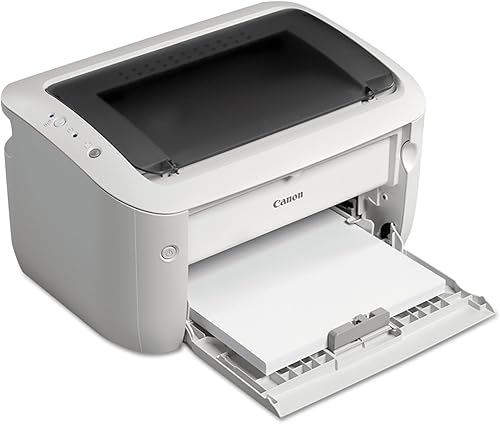
- Wireless printing
- Single-sided printing only
- 19 pages per minute
- 1-year limited warranty, per Canon
The LBP6030w is a budget wireless printer for light, one-sided printing. It fits a small desk and runs on Canon Genuine Toner 125.
Pros
- Budget pick in this guide
- Wireless printing
- Less than 2 watts in Energy Saver mode, per Canon
Cons
- Single-sided printing only
- Slowest in this guide at 19 pages per minute
The LBP6030w is the budget wireless pick for light printing. It prints wirelessly and uses Canon Genuine Toner 125, which Canon rates at 1,600 pages.
It prints one side only and runs at 19 pages per minute. It holds 150 sheets and weighs 11 pounds.
Canon offers a 1-year limited warranty on this model. It's the slowest unit here, so it suits a light workload best.
HL-L2460DW or DCP-L2640DW: which wireless Brother to buy
Buy the HL-L2460DW if you only print, and the DCP-L2640DW if you also copy and scan. Both connect over dual-band Wi-Fi, Ethernet and USB, and both use the Brother Mobile Connect app.
The HL-L2460DW scores higher because it's lighter and smaller, at 15.6 pounds against 25. The DCP-L2640DW adds a 50-page feeder, which matters only if you copy or scan stacks of pages.
Our HL-L2460DW review and DCP-L2640DW review cover each model in full.
Wi-Fi setup and placement for a wireless laser printer
Place a wireless printer where the Wi-Fi signal is strong, because a weak signal slows every print. A spot in the same room as the router is the simplest choice.
Dual-band Wi-Fi uses the 2.4 and 5 GHz bands, and the 5 GHz band is usually faster over short distances. The Brother DCP-L2640DW, HL-L2460DW and HL-L2405W all support both bands.
If the signal is weak, Ethernet is the fallback. The DCP-L2640DW, HL-L2460DW, M207dw and LBP122dw each have an Ethernet port.
Phone printing apps for a wireless laser printer
Each brand has its own app. Brother models use the Brother Mobile Connect app, Canon models use the Canon PRINT app, and HP models use the HP Smart app or phone printing through AirPrint.
The Brother app also tracks toner and lets you order cartridges. That's useful if the printer sits in a spot you visit rarely.
Keep the phone and printer on the same network before you print. Most setup problems come from a phone on a guest network.
Two-sided wireless printing saves paper
Automatic two-sided printing saves paper on reports and forms. Four of the six wireless printers here print both sides automatically.
The HL-L2405W needs a hand flip for two-sided work, and the LBP6030w prints one side only. If two-sided work matters, skip those two.
Which wireless laser printer fits your home
A wireless laser printer for a home office
The DCP-L2640DW is the most complete choice. It prints, copies and scans over Wi-Fi, with automatic two-sided printing and a document feeder.
A wireless laser printer for print-only jobs
The HL-L2460DW is the top pick here for print-only jobs, with two-sided printing and a 250-sheet tray. It suits a home where copy and scan are rare.
A wireless laser printer on a budget
The LBP6030w is the budget choice for light, one-sided printing. The HL-L2405W is the next step up if you want Brother's app and a 250-sheet tray.
Questions to ask before you buy a wireless laser printer
Ask how many devices print to it. A printer that serves a whole family needs dual-band Wi-Fi, and the Brother models here have it.
If you'd rather skip Wi-Fi entirely, our black and white laser printer guide covers wired and wireless picks side by side.
Ask whether you need a wired fallback. Ethernet on the DCP-L2640DW, HL-L2460DW, M207dw and LBP122dw covers a weak Wi-Fi spot.
Check the toner too. Each brand uses its own cartridges, so the cost you pay again is set by the cartridge you choose.
Warranty and support for a wireless laser printer
Brother lists a 1-year limited warranty on the DCP-L2640DW, HL-L2460DW and HL-L2405W, and Canon lists 1 year on the LBP122dw and LBP6030w. HP sets its own terms for the M207dw, so confirm them before you buy.
Brother says its support for those three models covers online, phone and live chat help for the life of the printer. Keep the receipt and the model number together for any claim.
Setting up Wi-Fi on a wireless laser printer
Have the Wi-Fi name and password ready before you start the setup. Most setups ask for both on the printer's screen or in the maker's app.
Keep the printer and phone close to the router during setup. Move the printer to its final spot after the connection works, so a weak signal doesn't stall the setup.
Print a test page from a laptop and from a phone. Two successful prints confirm the connection for both kinds of device.
Network security for a home wireless printer
Change the printer's default admin password during setup, and write the new one down somewhere safe. A printer with a default password is an easy target on a shared home network.
Keep the firmware current when the maker releases an update. Updates can fix connection and security problems.
Put the printer on your main home network, not a guest network. Phones on a guest network often can't see the printer, which causes many setup problems.
Common mistakes with a wireless laser printer
The most common mistake is placing the printer far from the router. A weak signal slows every print, and the fix is a closer spot or an Ethernet cable.
Another is skipping the phone app. The app is how many people print from a phone, so set it up before the first use.
A third is ignoring the toner plan. Brother offers an optional toner plan on some models, so read the terms before you enroll in a trial.
Our laser printer no subscription guide explains the terms.
Ethernet as a wired backup for a wireless printer
A wired connection is the steady option when Wi-Fi is weak in the room where the printer sits. The DCP-L2640DW, HL-L2460DW, M207dw and LBP122dw all have an Ethernet port, so you can run a cable from the router when the signal drops.
Ethernet also helps on a busy network where many devices compete for Wi-Fi. A wired link is less affected when the wireless network is under load.
Matching the printer to the room
Measure the space before you choose a wireless model. The LBP122dw is about 14.6 inches tall, so check the height under a shelf before you place it.
Keep the printer away from heat sources and crowded corners. A clear spot with air around the unit keeps the paper path easy to reach.
Printing from a laptop without the app
A laptop can print through the printer's driver, without the phone app. Download the driver from the maker's support site for your model, then choose the printer in the print dialog.
Keep the laptop on the same network as the printer. Printing from a guest network can make the printer hard to find.
A quick test print from the laptop after setup shows whether the driver works. Use a plain page, so any problem is easy to spot.
Which wireless laser printer to buy
Buy the HL-L2460DW if you print only and want two-sided pages on a fast printer that takes Wi-Fi or Ethernet. Buy the DCP-L2640DW if you also want one wireless laser printer that copies and scans.
Choose the HL-L2405W or the LBP6030w for light, one-sided printing from phones and laptops. Every model here connects over Wi-Fi, so the right choice depends on the copy, duplex and budget needs you have.
Our top 3 picks at a glance
-
1
-
2
-
3
Frequently asked questions
What is the best wireless laser printer for home?
The Brother HL-L2460DW is the best pick for most homes, because it connects over dual-band Wi-Fi, Ethernet and USB and prints on both sides automatically. If you also copy and scan, choose the DCP-L2640DW.
Do I need Ethernet on a wireless laser printer?
No, but it helps if your Wi-Fi is weak in the room where the printer sits. Several models here include Ethernet, so you can plug in a cable when you need a steady connection.
Can I print from my phone to a wireless laser printer?
Yes, on all six models. Brother and Canon each offer a phone app, and the HP LaserJet M207dw works with AirPrint, Android and Chromebook.


