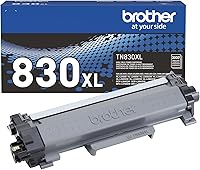
Brother Laser Printer Toner: Which Cartridge to Buy
Buy the Brother laser printer toner code that matches your printer's label or manual, such as TN-830 or TN-830XL for the HL-L2460DW. The XL cartridge prints more pages per box, but the code has to match first.
On this page (11 sections)
- Which toner code fits your Brother printer?
- How to read a toner cartridge box
- Standard or high yield: what the page counts mean
- Color toner for the TN-229 printers
- Genuine or another brand?
- Handle toner with care
- What to do when the printer says there's no toner
- Same family, different yield
- Common mistakes when buying Brother toner
- How to check the toner level before it runs out
- Pick the right code, then the right yield
Brother laser printer toner comes in several codes, and the code has to match your printer. Buy the toner code that matches your printer's label or manual, such as TN-830 or TN-830XL for the HL-L2460DW.
The XL cartridge prints more pages per box, but the code has to match first.
Which toner code fits your Brother printer?
Each Brother model takes one toner family, and the codes don't swap between families. Start with the model name, then find the family it takes.
- TN-830 and TN-830XL: the HL-L2460DW, DCP-L2640DW, HL-L2405W, HL-L2480DW and MFC-L2820DW.
- TN-730 and TN-760: older models such as the HL-L2350DW and MFC-L2710DW.
- TN-229: the color models, such as the MFC-L3780CDW.
If your model isn't on this list, the label on the printer and the supplies page in the manual are the final check.
How to read a toner cartridge box
The box shows the cartridge code, the page yield and the color. The code must match your printer's family, and the yield tells you how many pages to expect.
Brother lists the yield in pages on the box, and that's the number you need for cost math. Keep the code and the yield on a note in your phone, so you don't have to hunt for them at reorder time.
Standard or high yield: what the page counts mean
Brother laser printer toner yields at a glance
Brother rates the standard TN-830 at up to 1,200 pages and the TN-830XL high-yield at up to 3,000 pages. The TN-730 is rated at up to 1,200 pages, and the TN-760 high-yield at about 3,000, though Brother notes the yield may vary by use.
For a light home user, the standard cartridge can last a long time between changes. For a busy home office, the high-yield cartridge means fewer swaps and fewer trips to the supply shelf.
Color toner for the TN-229 printers
Color Brother models use four separate cartridges, one each for black, cyan, magenta and yellow. Each color has its own code, so you replace only the color that runs low.
Check the printer's panel or app to see which color is low before you order. Buying all four at once wastes money if only one color is down.
Genuine or another brand?
Brother says its own toner is the only brand it recommends for its mono printers. That's the maker's own position, and it's the safest pick for a printer you rely on.
Other brands can work, but check that the code matches exactly. Read the printer's notes on non-Brother supplies before you buy.
Handle toner with care
Keep new cartridges sealed until you install them, and keep them out of reach of children. Toner is a fine powder, so follow the handling steps in your manual if a cartridge leaks or spills.
Don't shake a used cartridge to free up more toner. Replace it when the printer says it's empty, or when the print turns faint across the whole page.
What to do when the printer says there's no toner
Check that the cartridge is seated and the tab is clear before you order a new one. A warning can also appear when a drum is near its end, so check both parts.
Our no toner error guide walks through the checks in order. The drum replacement guide covers the drum, which has its own code and its own life.
Same family, different yield
Some codes share a family and differ mainly in yield. The XL suffix marks the high-yield version, so the TN-830 and TN-830XL fit the same printers.
Pick the yield for your workload, but check that the family code matches before you order.
Common mistakes when buying Brother toner
Most mistakes come from matching the brand and skipping the model. These are the ones to watch for.
- Buying by the word Brother alone: the model's family decides the fit, not the brand name.
- Ordering a drum instead of toner: the drum is a separate part with its own code.
- Choosing the wrong yield for the workload: a standard cartridge on a busy printer means more swaps.
How to check the toner level before it runs out
Check the level once a week, or before any big job. The printer's panel or its app shows the level on most Brother models that support tracking.
- Keep one spare cartridge of the right code on hand for a busy printer.
- Note the code and the yield in your phone, so reordering takes a minute.
- Replace the cartridge when the printer says it's empty, not sooner, unless the print is already faint.
Pick the right code, then the right yield
Match the code first, then choose the yield. A high-yield cartridge suits steady printing, and the standard cartridge suits lighter use.
Before you order Brother laser printer toner, check the printer's own label and the cartridge box, since the code decides the fit. If you want to compare the cost of each choice, our laser printer cost per page guide shows how to work out the numbers.
Frequently asked questions
How do I find my Brother toner code?
Start with the model name on the printer's label, then check the supplies section of its manual. The cartridge box lists the code too, so match it exactly before you buy.
Can I use a TN-830 in an older Brother printer?
Not if the printer takes a different family. The TN-830 fits the HL-L2460DW class, while Brother lists the TN-730 and TN-760 for older models such as the HL-L2350DW and MFC-L2710DW.
Does a high-yield cartridge cost less per page?
Often, but check the numbers. Divide each cartridge's price by its rated yield, then compare the two results, and the cost per page guide walks through the math.