5 Best Laser Printers for a Home Office (October 2026)
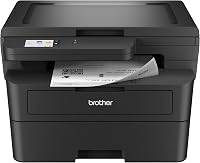
The best laser printers for a home office include the Brother DCP-L2640DW for a home office that copies and scans, the HP LaserJet Pro 3101sdw for a desk that scans and copies, and the HP LaserJet Pro 3001dw for printing only, with no scanner.
On this page (15 sections)
- The 5 best home office laser printers in detail
- Side by side: home office laser printers by speed, duplex and weight
- How we picked these five home office printers
- Scanner, feeder or print only: which home office fits?
- Do you still need fax in a home office?
- Paper trays and feeders for a busy desk
- Running costs for a home office printer
- Desk space and where the printer goes
- Network setup for a home office
- Mobile printing and the apps
- Paper handling for a busy home office
- Fax, scanning and the jobs you actually do
- How much desk room each pick needs
- Which home office printer fits which setup
- Which laser printer should a home office buy?
The best laser printer for a home office is the Brother DCP-L2640DW, which prints, copies and scans.
It handles two-sided pages on its own. The HP LaserJet Pro 3101sdw is a close second, with a 250-sheet tray and a feeder for stacks of paper.
A home office needs a printer that keeps up with a steady stream of work, most of it in black and white. The right model depends on whether you also scan, copy or fax, and on how much desk room you have for the machine.
We looked at five models that suit one person or a small team working from home. Each one earns its place on a different trait, so the best pick depends on your daily tasks.
Our picks at a glance
-
1

-
2

-
3

The 5 best home office laser printers in detail
The DCP-L2640DW scores highest because it covers printing, copying and scanning with the same 36-page speed as the top Brother models. The HP and Canon picks follow with scanners, fax and faster page rates.
Brother DCP-L2640DW
- 36 pages a minute in black
- Copy, scan and automatic duplex
- 50-page document feeder
- Dual-band Wi-Fi and Ethernet
The best all-round pick for a home office that prints, copies and scans. The feeder handles stacks of originals, and the speed is in the same class as the top Brother printers.
Pros
- 50-page feeder for multi-page originals
- Automatic two-sided printing at 36 pages a minute
- Mobile Connect for printing and scanning from a phone
Cons
- At 25 pounds, it needs a steady shelf
- Needs more desk room than a print-only model
The DCP-L2640DW is the all-round choice for a home office. It prints at 36 pages a minute in black, with automatic duplex, and it copies and scans through a 50-page feeder.
The feeder handles multi-page originals in one pass, so a stack of forms or receipts doesn't need a page-by-page scan. Wi-Fi and Ethernet are built in, and the Brother Mobile Connect app prints and scans from a phone.
At 25 pounds, it needs a steady shelf and more desk room than a print-only printer. Its toner is the TN-830 family, the same as the HL-L2460DW.
HP LaserJet Pro 3101sdw
- Up to 35 pages a minute in black
- Automatic two-sided printing
- 250-sheet input tray
- 50-sheet auto document feeder
An HP all-in-one with a feeder, a 250-sheet tray and automatic two-sided printing. HP pitches it at small teams with professional black and white documents.
Pros
- 250-sheet tray and 50-sheet feeder
- Automatic two-sided printing
- Fast copying with a feeder for multi-page jobs
Cons
- At 23.1 pounds, it needs a sturdy spot
- Its tray and feeder take more room than a print-only model
The HP LaserJet Pro 3101sdw is an all-in-one that prints, scans and copies. It runs up to 35 pages a minute in black and prints both sides on its own.
Its 250-sheet tray and 50-sheet feeder cover a busy desk, and the scan and copy jobs run without a computer. HP pitches it at small teams that print professional black and white documents.
At 23.1 pounds, it needs a sturdy spot, and its tray and feeder take more room than a print-only model. For a desk that scans often, it's the strongest HP here.
HP LaserJet Pro 3001dw
- Up to 35 pages a minute in black
- Automatic two-sided printing
- 250-sheet tray
- Intelligent Wi-Fi that finds the best connection
A print-only HP for a desk that doesn't need a scanner. It prints two sides at 35 pages a minute, and its Wi-Fi looks for the best connection.
Pros
- Automatic two-sided printing at 35 pages a minute
- 250-sheet tray
- Lighter than the HP all-in-one at 16.1 pounds
Cons
- No scanner or copier
- Scanning paperwork needs a separate device
The HP LaserJet Pro 3001dw is a print-only printer. It prints two sides at up to 35 pages a minute, and its 250-sheet tray holds a good stack.
Its Wi-Fi looks for the best connection and stays online, which helps when the printer sits in a room far from the router. HP says it's built for small teams that print black and white reports.
It has no scanner or copier, so it fits a desk where scanning happens somewhere else. At 16.1 pounds, it's lighter than the HP all-in-one, and it saves desk room.
Brother MFC-L2820DW

- 34 pages a minute in black
- Copy, scan and fax
- 50-page document feeder
- Automatic duplex
A fax-capable Brother all-in-one with a feeder and automatic duplex. It suits a home office that still sends and receives faxes.
Pros
- Fax, copy and scan in one body
- 50-page feeder
- Automatic two-sided printing
Cons
- Slower than the 35 and 36 page models above it
- At 22.5 pounds, it needs a sturdy desk
The MFC-L2820DW is the fax model in this roundup. It adds fax to print, copy and scan, and it prints at 34 pages a minute in black with automatic duplex.
A 50-page document feeder handles multi-page originals for copy and scan jobs. Wi-Fi, Ethernet and USB cover most desk setups, so it connects however your office is wired.
At 22.5 pounds, it's a desk-sized machine, and its toner is the TN-830 family used by the HL-L2460DW. Choose it only if you still need fax.
Canon imageCLASS MF462dw II
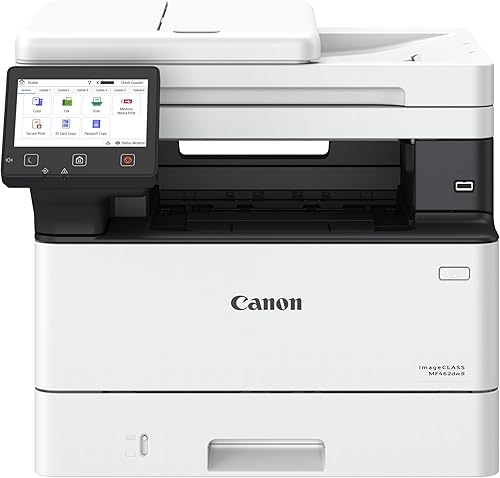
- 37 pages a minute in black
- Print, scan, copy and fax
- Automatic duplex
- Quick first print, per Canon
The fastest page rate in this roundup, in a four-in-one with fax. It's a heavy machine, so it fits a dedicated desk.
Pros
- 37 pages a minute in black
- Four functions in one body
- Automatic two-sided printing
Cons
- Heaviest pick at 46.6 pounds
- Canon's toner family doesn't share supplies with the Brother models
The MF462dw II is the fastest page rate in this roundup, at 37 pages a minute in black. It's a four-in-one with print, scan, copy and fax, and it prints both sides automatically.
Canon says it makes a quick first print, at about 5 seconds, so a single page comes out fast. That helps when you print one page at a time between calls.
At 46.6 pounds, it's the heaviest pick here, and it needs a dedicated desk. Its toner is Canon's 070 family, which doesn't share supplies with the Brother and HP models.
Side by side: home office laser printers by speed, duplex and weight
Speed is close across this group, with all five at 34 pages a minute or faster. Weight separates the picks more, from 16.1 pounds to 46.6 pounds.
| Product | Best for | Print speed | Duplex | Weight | Our score |
|---|---|---|---|---|---|
| Brother DCP-L2640DW | a home office that copies and scans | 36 pages a minute, black | Automatic | 25 lb | 8.6 |
| HP LaserJet Pro 3101sdw | a desk that scans and copies | 35 pages a minute, black | Automatic | 23.1 lb | 8.3 |
| HP LaserJet Pro 3001dw | printing only, with no scanner | 35 pages a minute, black | Automatic | 16.1 lb | 8.0 |
| Brother MFC-L2820DW | a home office that still faxes | 34 pages a minute, black | Automatic | 22.5 lb | 7.9 |
| Canon imageCLASS MF462dw II | speed in a four-in-one | 37 pages a minute, black | Automatic | 46.6 lb | 7.7 |
All five print both sides automatically, so duplex is not the deciding factor here. The scanner, the feeder and the fax are the three features that change the choice.
Measure the desk before you pick. The four all-in-ones need the most room, and the HP 3001dw needs the least.
How we picked these five home office printers
We compared the print speed, duplex, scanner, feeder, fax, tray size and weight for each model. We also checked the toner family, since the cartridge code sets the running cost after the printer price.
Our score weighs specs, features and buyer feedback against what you're shopping for. Scores run from 1 to 10, and a higher score means a closer fit for a home office.
Here's how the five landed:
- Brother DCP-L2640DW, 8.6: copy, scan and a 50-page feeder at 36 pages a minute.
- HP LaserJet Pro 3101sdw, 8.3: an all-in-one with a feeder and 250-sheet tray.
- HP LaserJet Pro 3001dw, 8.0: the print-only pick, with a 250-sheet tray.
- Brother MFC-L2820DW, 7.9: fax, copy and scan, with a feeder.
- Canon MF462dw II, 7.7: the fastest page rate here, in a heavy four-in-one.
Scanner, feeder or print only: which home office fits?
If you scan forms, receipts or contracts most days, choose a model with a feeder. The DCP-L2640DW and the HP 3101sdw both handle stacks of originals in one pass.
If you print and rarely scan, the HP 3001dw saves desk room and cost. It's a clean print-only choice for a home office with a separate scanner.
Do you still need fax in a home office?
Some offices still need fax for forms and for clients who only take fax. The MFC-L2820DW and the Canon MF462dw II are the two fax models in this roundup.
If you don't need fax, skip them. A printer with a feeder and no fax line is simpler to set up and keep running.
Paper trays and feeders for a busy desk
The tray size decides how often you refill, and a 250-sheet tray covers most home office days. The HP 3001dw and the HP 3101sdw both hold 250 sheets in the main tray.
The feeder matters for copy and scan jobs with many pages. The DCP-L2640DW and the MFC-L2820DW both use a 50-page document feeder.
Running costs for a home office printer
Toner sets the running cost, so compare the cartridge yield before you buy. The Brother cartridges come in standard and high-yield sizes, and the high-yield one suits a desk that prints every day.
Our laser printer cost per page guide walks through the math, and the Brother toner guide shows which code fits which model. For the printers in a bigger office, see the best laser printers for a small home business.
Desk space and where the printer goes
Measure the desk and the wall outlet before you order. All-in-ones need room for the feeder and the open lid, so measure with the lid up.
Leave space behind the printer for cables and the rear output. A printer pushed into a corner is harder to clear when a jam happens.
Network setup for a home office
Wi-Fi is the easiest route for a home office, since every laptop can reach the printer. Ethernet is the more stable option when the desk sits near the router.
Most of the picks here support both, so you can choose the path that fits your room.
Mobile printing and the apps
Brother's Mobile Connect app prints and scans from a phone on the DCP-L2640DW, and it tracks toner on the supported Brother models. Check that your phone works with the app before you buy, so the setup doesn't stall.
If you print from a phone often, that feature matters more than any spec on this list.
Paper handling for a busy home office
The 250-sheet tray covers most home office days without a refill. The feeder matters when you copy or scan a stack of pages, since it moves the pages for you.
Keep the paper type you use most in the main tray. Mixing paper types in one tray can cause feed problems.
Fax, scanning and the jobs you actually do
Fax matters only if you still send or receive faxes. Many home offices never touch fax, so you can save desk room by skipping it.
For most home offices, scanning gets more use than fax, so a feeder usually earns its place first.
For the full checklist on feeders, fax and duplex, see our all-in-one laser printer buying guide.
How much desk room each pick needs
Best laser printer for a home office, footprint by model
Desk room decides more fits than the speed rating does. Here is how deep, wide and tall each pick stands.
- HP LaserJet Pro 3001dw: 15.7 inches deep, 14.4 wide and 8.5 tall, the smallest footprint here.
- HP LaserJet Pro 3101sdw: 15.7 deep, 16.5 wide and 12.3 tall.
- Brother DCP-L2640DW and MFC-L2820DW: 15.7 deep, 16.1 wide and 12.5 tall.
- Canon MF462dw II: 18.1 deep, 16.6 wide and 14.8 tall, the largest footprint here.
Leave extra room for the lid and the feeder to open. Keep a clear gap behind the printer for the rear output as well.
Which home office printer fits which setup
- A desk that copies and scans every day: the Brother DCP-L2640DW, with a 50-page feeder and automatic duplex.
- A desk with a feeder and a 250-sheet tray: the HP LaserJet Pro 3101sdw.
- Print-only work, with less desk room used: the HP LaserJet Pro 3001dw.
- A desk that still sends fax: the Brother MFC-L2820DW.
- Speed first, with room for a heavy machine: the Canon MF462dw II, at 37 pages a minute.
If you're not sure, settle the scanner question first. That answer narrows the list faster than any other spec.
Which laser printer should a home office buy?
Pick the DCP-L2640DW for the best all-round home office printer with copy and scan. Pick the HP 3101sdw if you want an HP with a feeder and a 250-sheet tray.
Pick the HP 3001dw for print only and a smaller footprint, and the MFC-L2820DW if fax is still part of your work. The Canon MF462dw II is the choice for speed in a four-in-one, provided you have the desk room.
For the strongest picks across all brands, the pillar guide is the place to start.
Our top 3 picks at a glance
-
1
-
2
-
3
Frequently asked questions
What is the best laser printer for a home office?
For most home offices, the Brother DCP-L2640DW is the best all-round pick. It prints at 36 pages a minute, copies and scans through a 50-page feeder, and handles two-sided printing automatically.
Do I need a scanner in a home office printer?
Only if you scan forms, receipts or contracts often. If you mostly print, a print-only model like the HP LaserJet Pro 3001dw saves desk space and cost.
Is fax still needed in a home office?
Some offices still need it for forms and clients who only accept fax. If you don't need fax, skip the MFC-L2820DW and the Canon MF462dw II, since the DCP-L2640DW and HP 3101sdw copy and scan without it.
Are home office laser printers good for two-sided printing?
Yes, all five picks here print both sides automatically. Budget models sometimes use manual duplex instead, so check that setting on any other printer you consider.