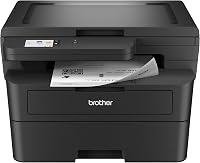
Best Economical Laser Printers for Home Use: How to Choose
The best economical laser printer for home use is a mono model whose toner yield and paper capacity match your monthly page count, not simply the one with the lowest purchase tier. Pick a print-only unit for documents and a multifunction unit when you also copy, scan or fax.
On this page (10 sections)
- What does economical really mean for a home laser printer?
- How much should you spend on a budget home laser printer?
- How fast does a home laser printer need to print?
- How much paper capacity do you need at home?
- Print-only or all-in-one: which fits your home?
- How should you connect a home laser printer?
- Which of these economical mono printers should you pick?
- Which toner and drum costs should you compare?
- What should you check before buying an economical laser printer?
- Which economical laser printer should you buy?
The best economical laser printer for home use is a mono model that keeps your cost per page low and your monthly volume in mind. That means looking past the sticker tier at toner yield, paper capacity and how you connect.
This guide walks through the decisions in order. You will see how each choice changes your running cost, and where the three mono models we compared fit a typical household.
What does economical really mean for a home laser printer?
Economical means low cost across the life of the printer, not the lowest purchase tier. A cheap unit with a small cartridge can cost more over a year than a slightly dearer model with high-yield toner.
Start by estimating your monthly page count. Count the documents you print now and add the school forms, labels and return slips that creep in.
Then divide your count into the cartridge yield. A 2,300-page toner cartridge covers roughly 19 months at 120 pages a month.
Why toner yield drives your real cost per page
Toner is where most of the money goes after the printer is in the house. A cartridge rated for 2,300 pages spreads its cost across far more printing than a starter cartridge rated for a few hundred.
Check whether a high-yield version exists for the model you are considering. Brother, for example, offers TN830 standard and TN830XL high-yield toner for several of its mono printers.
Also check whether the drum is separate from the toner. A separate drum unit means you replace it less often than the toner, which keeps each page cheaper.
Pick the model whose toner yield fits your volume first, and treat speed and features as tie-breakers. That order keeps a budget laser printer genuinely economical.
How much should you spend on a budget home laser printer?
Spend enough to cover your real volume, then stop. A mono laser with a 250-sheet tray and high-yield toner covers most homes without paying for features you won't use.
Price tiers are easy to compare in general terms. An entry print-only unit sits at the low end, while a multifunction unit costs more because it adds copy, scan and often fax.
The trap is buying too little printer and replacing cartridges often. The other trap is buying a multifunction unit when you only print documents.
Set a rough ceiling and then rank your needs. If you print fewer than 100 pages a month, an entry model fits.
Above that, a faster unit with a big tray earns its higher tier.
When an entry model is enough and when it isn't
An entry mono printer is enough when your printing is light and mostly text. School notes, shipping labels, tickets and the odd letter fit a simple unit well.
It stops being enough when you copy IDs weekly, scan paperwork or print hundreds of pages. Then the extra functions and paper capacity of an all-in-one save you time and trips.
Decide your page count and your copying needs before you set the budget. Then the economical choice is obvious, because you stop paying for either too little or too much printer.
How fast does a home laser printer need to print?
Print speed matters when more than one person prints or you send multi-page jobs. For a single user printing a few pages at a time, 19 to 20 pages per minute is plenty.
Speed shows up in the spec as pages per minute, or ppm. A 19 ppm unit prints a 20-page report in about a minute, while a 30 ppm unit finishes in around 40 seconds.
The bigger factor for most homes is first-page time. A laser printer warms up before its first page, so look at the time to first print when you care about short jobs.
Pages per minute vs time to first page
A high ppm figure helps long jobs. A short time to first page helps the jobs most homes actually run: a label here, a boarding pass there.
Compare both numbers when the printer sits idle most of the day. A unit that wakes and prints quickly feels faster than one with a higher ppm but a slow start.
Weigh speed against your longest regular job. If you rarely print more than five pages, a 19 ppm model is not a compromise; the extra speed would go unused.
How much paper capacity do you need at home?
A 250-sheet tray covers most homes for a month or more. A 150-sheet tray means more refills, which is fine for light use but annoying for a busy desk.
Paper capacity is one of the clearest signals of how often you will stop to reload. A 250-sheet tray at 100 pages a month means a refill roughly every ten weeks.
An auto document feeder is the paper-handling feature that matters most for copying and scanning. A 50-page feeder lets you load a multi-page form and walk away.
Paper tray size and document feeder choices
Check the maximum media size if you print legal documents. Several mono models handle up to 8.5 x 14 inches, which covers letters, legal and most labels.
A manual feed slot helps when you print envelopes or specialty paper. It bypasses the main tray, so you don't have to empty it for one odd sheet.
Choose the tray size and feeder from your copying habits, not from the number on the box. A light home printer does not need a 50-page feeder, while a family that scans school packets will use it constantly.
Print-only or all-in-one: which fits your home?
Choose print-only when documents are your main job; choose an all-in-one when copying and scanning are part of your week. The multifunction unit replaces several devices, so the decision comes down to how often you use those functions.
A print-only unit is smaller, lighter and simpler. It also tends to cost less for the same print speed, which makes it the economical pick for a desk that only prints.
An all-in-one adds a scanner and copier in one footprint. The catch is size: a multifunction model takes up more desk space and weighs more.
If you are weighing the two shapes more broadly, our laser printer for home use guide compares the whole category.
Copier, scanner and fax needs at home
Copying matters for IDs, forms and school paperwork. An ID card copy function duplicates both sides of a card onto one sheet, which saves a step.
Scanning matters when you keep digital records instead of paper. A document feeder makes multi-page scans practical, while a flatbed handles single pages and books.
Fax is rarer at home, but some households still send medical or legal paperwork. Only pay for fax if you know you will use it.
List the functions you used in the last year, then buy for those. A print-only model plus a phone scanner app often beats an all-in-one you rarely copy on.
How should you connect a home laser printer?
USB is enough for one computer on one desk; wireless earns its place when several devices print from different rooms. Connection choice changes convenience more than running cost.
A USB-only unit needs a cable to one computer. That is simple and secure, and it suits a printer that stays beside a desktop.
Wireless models connect phones, tablets and laptops without cables. Dual-band wireless on 2.4GHz and 5GHz gives you a choice when the home network is crowded.
USB vs wireless and Ethernet at home
Ethernet is the most stable connection when the printer sits near a router. It is less common at home, but useful in a room with a wired network.
A wireless laser printer is the flexible middle option. The wireless laser printer guide covers setup and network choices in more depth.
A mobile app adds remote printing and toner tracking. It helps when you print from a phone, though it is not a reason on its own to pay more for a model.
Pick the connection by how many devices will print. One computer means USB; a family with phones and tablets means wireless.
Which of these economical mono printers should you pick?
The Canon imageCLASS MF3010 VP is our top pick overall because its 2,300-page in-box toner yield makes it the most economical for a household that also copies and scans. The two Brother models are the better fit for lighter or busier printing needs.
Our score weighs specs, features and buyer feedback against what you are shopping for. All three are mono laser printers, so the choice comes down to function, speed and volume.
| Model | Best for | Print speed | Paper capacity | Connections |
|---|---|---|---|---|
| Canon imageCLASS MF3010 VP | Best overall for low running cost | 19 ppm | 150 sheets | USB |
| Brother HL-L2405W | Best print-only value | 30 ppm | 250 sheets | Wireless, USB |
| Brother MFC-L2820DW | Best for a busy home office | 34 ppm | 250 sheets | Wireless, Ethernet, USB |
Canon imageCLASS MF3010 VP

Canon imageCLASS MF3010 VP: the economical all-rounder
The Canon imageCLASS MF3010 VP packs a printer, copier and scanner into one unit. Its in-box toner yield is the standout number here: 2,300 pages across a 700-page starter cartridge and a 1,600-page extra cartridge.
Scanning runs in color up to 600 dpi, which covers forms, receipts and ID cards. The ID Card Copy function puts both sides of a card on one sheet.
It prints at 19 ppm with an 8-second first page. The 150-sheet tray is smaller than the Brothers, so it needs refilling more often.
Choose it when low running cost and copying matter more than speed. Skip it if you print heavily or need wireless from several devices.
Brother HL-L2405W

Brother HL-L2405W: the print-only value pick
The Brother HL-L2405W prints one-sided documents at up to 30 ppm. Its 250-sheet tray reduces refills, and the manual feed slot handles envelopes and specialty paper.
Connection options are broad for a print-only unit: dual-band wireless for several devices and USB for a single computer. The Brother Mobile Connect app adds remote printing and toner tracking.
It prints only, so copying and scanning happen elsewhere. The duplex setting is manual, which means you flip pages yourself for two-sided output.
Choose it for a light-to-moderate print load with no copying needs. For busier desks or a full home office, our laser printer for home office guide compares faster options.
Brother MFC-L2820DW

Brother MFC-L2820DW: the busiest home office
The Brother MFC-L2820DW adds copy, scan and fax to a fast mono printer. Print speed reaches 34 ppm, and the 50-page auto document feeder takes multi-page copy and scan jobs off your hands.
Automatic duplex printing saves paper on longer documents. A 2.7-inch touchscreen supports printing from and scanning to cloud apps.
Its 250-sheet tray and dual-band wireless, Ethernet and USB connections cover a busy household. The larger footprint and heavier weight are the trade-off against the compact HL-L2405W.
Choose it when your home prints, copies and scans regularly. For a family that also needs color or more scanning features, our all-in-one laser printer for home use roundup lists more choices.
Which toner and drum costs should you compare?
Compare cartridge yield and drum life before you buy, because those two numbers set your cost per page. The printer's purchase tier is a one-time cost; toner and drum are recurring.
Find the exact cartridge model for each printer you consider. Then look for a high-yield version, which prints more pages per cartridge.
Check whether the drum is separate. A separate drum unit is replaced less often than toner, which lowers running cost over several years.
Cartridge yield and replacement cycles at home
A high-yield cartridge costs more up front but spreads that cost across more pages. At 100 pages a month, the extra pages matter more than the up-front difference.
Replacement cycles follow your volume. A 2,300-page cartridge at 50 pages a month lasts nearly four years; at 300 pages a month it lasts about eight months.
Match the yield to your volume and skip the cheapest cartridge tier. If toner costs are your main worry, our toner and drum care guide covers replacement and storage in detail.
What should you check before buying an economical laser printer?
Check four things in order: your monthly page count, the toner yield, the paper capacity and the connections. Each one changes either your running cost or your daily convenience.
Your page count sets the volume the printer must handle. The toner yield tells you the cost per page.
Paper capacity decides how often you reload. Connections decide who can print.
Then confirm the printer's size against the spot you have. A compact mono unit like the HL-L2405W fits a desk corner at about 14 inches deep, while a multifunction unit needs more room.
A short checklist before you buy
Check the cartridge model and whether a high-yield version exists. Check the paper tray size and the maximum media size.
Check the connection types against your devices. Check the drum type and its replacement interval.
Finally, measure the desk space against the printer's dimensions. If you want the full category comparison, start with our best economical laser printer for home use picks and work down from your volume.
Write your page count and copying needs on paper first, then compare models against those two numbers. That single step keeps the printer economical for years, not just on the day you buy it.
Which economical laser printer should you buy?
Buy the Canon imageCLASS MF3010 VP if you copy and scan as well as print, because its in-box toner covers 2,300 pages and its price tier stays low. Buy the Brother HL-L2405W for light print-only use, or the Brother MFC-L2820DW if your home prints heavily and needs a document feeder.
The best economical laser printer for home use is the one whose running cost fits your volume. A light household saves more with a simple print-only unit, while a busy desk gets more value from a faster all-in-one.
Start with your page count, then your copying needs, then your connections. Those three answers narrow the choice to one model, and the toner comparison confirms it.
Whichever you pick, keep a spare cartridge model number on hand. Ordering the right toner before the last page prints keeps your economical printer running without a gap.
Frequently asked questions
What makes a laser printer economical for home use?
Cost per printed page matters more than the purchase tier. A mono laser spends toner only when it prints, so a model with a high-yield cartridge and a large paper tray often costs less over a year than a cheap printer with small cartridges.
Is a mono laser printer cheaper to run than a color inkjet?
For black-and-white documents, usually yes. Mono toner cartridges print many more pages per cartridge than ink tanks, and the printer does not clog when it sits unused.
Color pages are a different question, so check whether you need color at all.
How many pages per month should a home laser printer handle?
Match the duty to your real volume. A light household printing 30 to 50 pages a month is served by an entry mono model, while 100 to 300 pages a month calls for a faster unit with a bigger tray and high-yield toner options.
Do I need a wireless laser printer at home?
Only if phones, tablets or laptops in different rooms will print. A USB-only unit is fine for one computer on a desk.
A wireless laser printer adds convenience for a household that prints from several devices.
Should I buy a print-only laser or an all-in-one?
Choose print-only if you mainly print documents and already have a way to scan. Choose an all-in-one when copying IDs, scanning forms or faxing is part of your routine, since one machine replaces several.
What should I check before buying toner for a cheap laser printer?
Find the exact cartridge model the printer uses and whether a high-yield version exists. Also check how many pages each cartridge is rated for and whether the drum is separate, because those two numbers drive your long-term cost.