How Does a Laser Printer Work?
Here is how a laser printer works: a light beam draws the page on a drum, static electricity picks up the toner, and heat fuses it onto the paper. Knowing each step helps you find the part behind a bad print.
On this page (10 sections)
- How a laser printer works, step by step
- Why toner only sticks where the laser wrote
- What the fuser does to your pages
- Why the drum and toner wear out at different times
- What the parts mean when you choose a laser printer
- Why a laser print looks sharp on text
- Safety around toner and the fuser
- How a laser printer differs from an inkjet on the page
- Spotting the part behind a bad print
- When a laser printer does not work as it should
How does a laser printer work? It builds each page as an electric pattern, then fills that pattern with toner.
Here is the process step by step, and why each part matters when you choose a printer.
You don't need the physics to buy a good one. You do need to know the parts, because the parts are what wear out and what you replace.
How a laser printer works, step by step
A laser printer makes each page in five steps: charge, write, develop, transfer and fuse. The drum carries the image through the first three, then the paper picks it up and the fuser sets it.
Each step depends on one part, so a fault in one step shows up as a particular kind of bad print. That's useful when you're troubleshooting.
Why the laser printer works with a charged drum
The drum is a metal cylinder with a light-sensitive surface. Before each page, a charging part gives that surface an even electric charge.
At this stage the drum holds no image. It's ready to take one.
How the laser writes the page
A laser beam sweeps across the drum. In LED models, a row of small lights does the same job.
Wherever the light hits, the charge drops, and that spot becomes part of the image. As the drum turns, the light writes the page one line at a time.
The result is an invisible pattern of charged and uncharged areas on the drum.
Why toner only sticks where the laser wrote
Toner is a fine powder with an electric charge. It clings to the spots the light has discharged, and it stays off the rest of the drum.
That is the develop step. The drum now holds the page as a dusting of toner.
The transfer step comes next. A transfer roller gives the paper a stronger pull than the drum, so the toner jumps across to the sheet.
The paper now carries the image as loose powder. A page can smudge if you rub it before the fuser has set the toner.
How the toner cartridge and the drum differ
The toner is the powder that makes the mark. The drum is the part that holds the image long enough to move it to the paper.
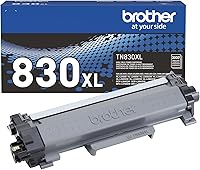
Many home models, Brother's included, sell the toner cartridge and the drum as separate parts. The two wear out on different schedules, so you replace each one when it's due.
What the fuser does to your pages
The fuser is the last stop. It's a heated roller with a pressure roller beside it, and the two melt the toner into the paper as the sheet passes through.
Once the page cools, the melted toner holds well. Laser prints are generally less prone to smudging than inkjet prints on plain paper.
The fuser is hot, so let the printer cool before you open a cover or clear a jam. Wait for a finished page to leave the output tray before you touch it.
Why the drum and toner wear out at different times
The drum wears down with use, even when the toner still has plenty left. The toner runs out as it's used, and you'll often notice that first on the printed page.
Brother's TN830 toner and DR830 drum unit show this split. The cartridge and the drum are sold separately, so you buy each one when it's due.
For the replacement steps, read our guides on when to replace a Brother drum and which Brother toner to buy.
What the parts mean when you choose a laser printer
Check that replacement toner and drums are sold for that exact model before you buy. A printer is only as easy to keep running as its supplies.
Three printers from this guide show how the choices differ. The first prints only, the second copies and scans, and the third is a small all-in-one.
All three use toner, so the five steps above apply to each one.
Why a laser print looks sharp on text
A laser builds each page from a fine grid of tiny dots, and the toner only lands where those dots were written. That grid keeps letter edges clean, which is why laser prints suit forms, letters and school papers.
Copy resolution is one number to read with care, because makers quote copy and print figures differently. The DCP-L2640DW's copy resolution is 600 by 600 dpi in black and white, which is enough for everyday text.
Crisp text also depends on the fuser setting the toner firmly on the sheet. Faint or uneven letters are often the first sign that the toner or the drum needs attention.
Laser prints often feel slightly raised, because the toner sits on top of the paper. That's normal, and it's part of what keeps the text sharp.
Safety around toner and the fuser
Toner is a fine powder, so avoid breathing it in. Don't shake a cartridge, since that puts more dust into the air.
If toner spills, wipe it with a damp cloth or use a vacuum made for toner dust. A regular vacuum can blow fine dust back into the room.
If you have ongoing breathing trouble, see a doctor. Keep cartridges and drums out of reach of children and pets.
How a laser printer differs from an inkjet on the page
An inkjet sprays liquid ink through tiny nozzles, while a laser fuses dry toner onto the page. That one difference explains much of the gap in smudging, drying out and running cost.
Our laser vs inkjet comparison covers the choice for home use.
Spotting the part behind a bad print
Each kind of bad print points to a likely part. These patterns are a starting point, not a diagnosis.
- Faint, even print often means low toner or a drum near the end of its life.
- Vertical streaks often point to the drum or a dirty part inside the printer.
- Smudges that rub off often point to the fuser or to paper that isn't feeding cleanly.
- Repeated dark spots often come from the drum, since they can repeat each time the drum turns.
Check the toner first, since it's the cheapest part to test. Then check the drum before you call for service.
When a laser printer does not work as it should
Most faint, streaky or smeared pages trace back to the toner, the drum or the fuser. Check the toner level and the drum first, before you blame the printer.
If the printer shows a message about toner, see what to check when a Brother laser printer says no toner.
For a wider look at models, start with the pillar guide to the best laser printer for home use.
Frequently asked questions
Does a laser printer use ink?
No. A laser printer uses dry toner, a fine powder that static electricity pulls onto the page and heat melts into the paper.
Why does a laser printer need heat?
Heat melts the toner so it bonds to the paper instead of brushing off. The fuser, a heated roller with a pressure roller beside it, does that job as the sheet passes through.
What is the drum in a laser printer?
The drum is a cylinder with a light-sensitive surface. It takes an electric charge, holds the page image until toner is applied, and then passes that image to the paper.
Is toner safe to breathe?
Toner is a fine powder, so avoid breathing it in and don't shake a cartridge. If you have ongoing breathing trouble, see a doctor.