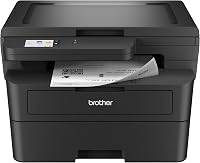
Brother DCP-L2640DW vs HL-L2480DW: What Is the Difference? (October 2026)
The DCP-L2640DW is the better pick for copying and scanning stacks of pages, because its 50-page feeder handles them for you. The HL-L2480DW suits a desk that scans single pages from the glass and wants a touchscreen for cloud apps.
On this page (21 sections)
- Brother DCP-L2640DW vs HL-L2480DW: feeder or flatbed
- Printing speed and two-sided pages
- The HL-L2480DW touchscreen and cloud apps
- Mobile printing on the DCP-L2640DW
- Paper trays and the 250-sheet tray
- Size, weight and where each one fits
- Toner and drum: the same TN830 family
- Specs side by side
- Which Brother fits your home office
- Warranty and support on both models
- Who should buy the DCP-L2640DW
- Who should buy the HL-L2480DW
- Paper handling for stacks and single pages
- Setup and the first print
- Shared office use
- Energy and paper waste
- Common questions about these two
- Toner use, reorders and the Refresh plan
- What to check before you order
- Common mistakes with these two
- Brother DCP-L2640DW or HL-L2480DW: which to buy
Pick the DCP-L2640DW for stacks of pages and the HL-L2480DW for single pages and a touchscreen. Both are Brother all-in-ones that print two-sided at 36 pages a minute, so the real difference is how each one feeds and scans pages.
This page sets out that difference so you can match the printer to the paper you handle. It also covers the setup and supply questions that come up for both models.

 Best for a touchscreen and cloud scanning at the desk
Brother HL-L2480DW
Brother DCP-L2640DW vs HL-L2480DW: feeder or flatbed
The DCP-L2640DW has a 50-page automatic document feeder. You load a stack, and the printer copies or scans it without help.
The HL-L2480DW scans from a flatbed glass, so you place each page yourself. That suits a book, a photo or a few pages, while a feeder saves time on a stack of forms or school handouts.
Scan speed on the Brother DCP-L2640DW
Brother rates the DCP-L2640DW's scanning at up to 23.6 images a minute in black and white, and up to 7.9 in color. Those are the maker's figures, and large or heavy graphics slow a real job down.
The feeder matters most when the stack is long. A short stack on the glass is quick on either model.
Printing speed and two-sided pages
Both models print at 36 pages a minute in black and white, and both print two-sided automatically. Printing speed won't separate these two.
The feeder and the touchscreen are the real choice. Pick the feeder if stacks come up often, and pick the touchscreen if you mainly scan single pages to a cloud folder.
The HL-L2480DW touchscreen and cloud apps
The HL-L2480DW has a 2.7-inch touchscreen for menus, copy settings and scan jobs. That screen is the main thing this model adds over the DCP-L2640DW.
It can print from and scan to cloud apps such as Google Drive, Dropbox, Evernote and OneNote. You can send a scan straight to a cloud folder without a computer.
Mobile printing on the DCP-L2640DW
If you don't need the touchscreen, the DCP-L2640DW handles mobile printing and scanning through the Brother Mobile Connect app. That covers most phone printing needs at a desk.
The app can also track toner use, which helps you plan reorders.
Paper trays and the 250-sheet tray
Both models have a 250-sheet main tray. That means the same refill interval on a busy week, so paper supply doesn't split the two.
Load the tray with the guides snug against the paper, so each sheet feeds straight. The feeder on the DCP-L2640DW needs the same care with its guides.
Size, weight and where each one fits
Both printers share the same width and depth, 16.1 inches by 15.7 inches. The DCP-L2640DW stands 12.5 inches tall and weighs 25 pounds, against 10.7 inches and 22.2 pounds for the HL-L2480DW.
Measure the height if the printer will sit under a shelf. Leave room above the DCP-L2640DW's feeder lid, so it can lift fully.
Toner and drum: the same TN830 family
Both use the TN830 toner family and the DR830 drum unit, so the supplies match. Standard TN830 and high-yield TN830XL cartridges fit either printer.
Both also take the TN830XL 2-pack. The drum is a separate part on both, so plan its replacement on its own schedule.
For the replacement steps, read the Brother toner guide and the drum replacement guide.
Specs side by side
The table below shows speed, duplex and body size, the three rows that set these two apart from the rest of the Brother range.
| Product | Best for | Print speed | Duplex | Size (W x D x H) | Our score |
|---|---|---|---|---|---|
| Brother DCP-L2640DW | copying and scanning stacks of pages | 36 pages a minute | Automatic | 16.1 x 15.7 x 12.5 in | 8.6 |
| Brother HL-L2480DW | a touchscreen and cloud scanning at the desk | 36 pages a minute | Automatic | 16.1 x 15.7 x 10.7 in | 8.2 |
Which Brother fits your home office
The DCP-L2640DW fits a desk that handles paper every day, with stacks to copy and scan. The HL-L2480DW fits a desk that scans single pages and uses cloud apps often.
If you only print, the HL-L2460DW review covers a print-only Brother that skips the copy and scan parts.
Warranty and support on both models
Brother backs both printers with a 1-year limited warranty. Brother also offers free online, call and live chat support for the life of the printer.
We can't judge long-term reliability from specs alone. Read the best all-in-one laser printer guide for how these models compare with others.
Who should buy the DCP-L2640DW
Buy the DCP-L2640DW if the printer copies and scans most weeks. The feeder changes the workflow, since a stack goes in once and comes out copied or scanned.
It also suits a home office where several people print, copy and scan from one desk. The two-sided printing keeps paper use down on long jobs.
Who should buy the HL-L2480DW
Buy the HL-L2480DW if you scan single pages more often than stacks. The flatbed glass is the right tool for books, photos and forms that can't go through a feeder.
It also suits a desk that uses cloud apps every day. The touchscreen makes those jobs quicker to set up, since you can pick a cloud folder on the panel.
Paper handling for stacks and single pages
For a stack on the DCP-L2640DW, load the feeder, set the guides snug and fan the pages first. That helps the sheets feed one at a time.
For a single page on the HL-L2480DW, lift the lid, place the page face down on the glass and close the lid. Then start the copy or scan from the touchscreen.
Setup and the first print
Both printers connect over dual-band Wi-Fi. Use the Brother app or the printer's panel to join your network, then print a test page before you send a long job.
If the printer can't find your network, check the band and the password first.
Shared office use
Both printers suit a few people sharing one desk, since both have a 250-sheet tray and automatic duplex. The DCP-L2640DW adds the feeder, which matters most when several people send stacks of paper.
Energy and paper waste
Brother says both models are ENERGY STAR compliant and EPEAT Silver rated. Both also have a Toner Save Mode, and automatic two-sided printing cuts the paper a long job uses.
Check the energy label on each printer before you buy, to confirm the rating for the model you pick.
Common questions about these two
- Can the HL-L2480DW copy a stack? Only one page at a time, on the glass.
- Does the DCP-L2640DW have a touchscreen? It has an LCD panel, not the 2.7-inch touchscreen of the HL-L2480DW.
- Do they use the same supplies? Yes, both use the TN830 family and the DR830 drum.
- Can I use the Brother app with both? Yes, both support the Brother Mobile Connect app.
Toner use, reorders and the Refresh plan
Both printers use the TN830 family, so one set of supplies covers either model. Brother offers an optional Refresh EZ Print plan on both, and you can skip it.
The DCP-L2640DW's app tracks toner use, which helps you plan reorders before a cartridge runs out. Keep the model codes handy when you order, so you match the right cartridge and drum.
What to check before you order
- Decide whether you need a feeder for stacks, or a flatbed for single pages.
- Measure the desk height, since the DCP-L2640DW stands 12.5 inches tall.
- Decide whether a touchscreen matters to you.
- Write down the Wi-Fi network name and password before setup.
Common mistakes with these two
- Buying the HL-L2480DW expecting a feeder. It scans from the glass, one page at a time.
- Buying the DCP-L2640DW for its touchscreen. It has an LCD panel instead.
- Forgetting height. The DCP-L2640DW is about 2 inches taller, which matters under a shelf.
Check those three points against your desk and your paper, and the right model usually stands out.
Brother DCP-L2640DW or HL-L2480DW: which to buy
Buy the Brother DCP-L2640DW if you copy and scan stacks of pages most weeks. Buy the Brother HL-L2480DW if you scan single pages more often and want a touchscreen for cloud apps.
Frequently asked questions
Which is better, the DCP-L2640DW or the HL-L2480DW?
For copying and scanning stacks of pages, the DCP-L2640DW is the better pick, because its 50-page feeder does the work. For single pages and a touchscreen, the HL-L2480DW fits better.
Does the HL-L2480DW have a feeder?
The HL-L2480DW copies and scans from a flatbed glass, so you place each page yourself. If you regularly work through stacks, the DCP-L2640DW is the better fit.
Do both Brother models use the same toner?
Yes. Both use the TN830 toner family, including standard TN830 and high-yield TN830XL cartridges, and both use the DR830 drum unit.
Which one needs more desk space?
They share the same width and depth, 16.1 by 15.7 inches. The DCP-L2640DW is 12.5 inches tall and the HL-L2480DW is 10.7 inches, so measure the height if the printer sits under a shelf.