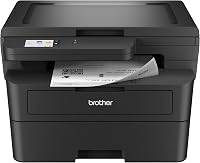
Brother DCP-L2640DW Review: Wireless Mono All-in-One (October 2026)
The Brother DCP-L2640DW is a wireless black and white all-in-one for a home office that prints, copies and scans, with automatic two-sided printing. Skip it if you only print, since a print-only Brother covers that job in a smaller body.
On this page (17 sections)
- The Brother DCP-L2640DW at a glance
- Who the Brother DCP-L2640DW suits
- What's in the box
- Copying and scanning with the 50-page feeder
- Printing speed and automatic two-sided pages
- Paper tray and feeder handling
- Wireless setup, Ethernet and mobile printing
- Toner and drum: what you'll reorder
- Setup in the first hour
- Problems to check before you buy
- Is the Brother DCP-L2640DW good for a home office?
- Size, weight and desk space
- Specs of the Brother DCP-L2640DW
- How the DCP-L2640DW compares with nearby Brother models
- Who should skip the DCP-L2640DW
- How we scored the DCP-L2640DW
- Is the Brother DCP-L2640DW worth it for your home office?
The Brother DCP-L2640DW is a compact black and white laser all-in-one. It prints, copies and scans from one body, and it adds a 50-page feeder for stacks of paper.
Brother pitches it at small businesses, but it suits a home office that handles a lot of paperwork. This review covers who it suits, what it does well and where it falls short, based on the specs Brother publishes.
The Brother DCP-L2640DW at a glance
The printer is a wireless mono all-in-one, and the card below has the key facts. The sections that follow go through each one in turn.
Brother DCP-L2640DW

- 36 pages a minute in black and white
- 50-page automatic document feeder
- 250-sheet paper tray
- Automatic two-sided printing
- Dual-band Wi-Fi, Ethernet and USB 2.0
The copy and scan model in the Brother range here, with a feeder for stacks and two-sided printing built in. It suits a home office that does more than print.
Pros
- Feeder handles multi-page originals
- Automatic two-sided printing at 36 pages a minute
- Brother backs it with a 1-year limited warranty
Cons
- At 25 pounds, it needs a steady shelf or desk
- Taller than the print-only Brothers, at 12.5 inches
The card shows the main facts, and the sections below explain how they play out at a desk.
Who the Brother DCP-L2640DW suits
It suits a home office that copies and scans as well as prints. It also works for a family desk that handles school forms, bills and other paperwork in bulk.
It's a poor fit for a desk that only prints. A print-only Brother is smaller and lighter, and it covers that job in less space.
Is the Brother DCP-L2640DW right for your desk?
If you feed a stack of pages through a copier or scanner most weeks, the feeder earns its place. If you copy a page once in a while, a print-only model with a simpler body may be easier to live with.
Check the room first. At 25 pounds and 12.5 inches tall, the DCP-L2640DW needs a steady surface and clear space above it.
What's in the box
The Brother DCP-L2640DW ships with a drum unit and toner cartridges, along with the AC power cord.
That means you'll set up the drum and toner before the first print. Keep the packing material until the printer is working, in case you need to return it.
Copying and scanning with the 50-page feeder
The feeder is the reason to pick this model. It takes a stack of up to 50 pages, so you can copy or scan a multi-page form without laying each sheet on glass.
Brother rates scanning at up to 23.6 images a minute in black and white and 7.9 in color. Those are the maker's figures, and large or heavy graphics slow real jobs down.
Copy resolution tops out at 600 by 600 dpi in black and white. That's enough for everyday documents, forms and text.
Printing speed and automatic two-sided pages
The printer prints at 36 pages a minute in black and white. Brother says the first page comes out in about 8.5 seconds.
Automatic two-sided printing is built in, so a 10-page report uses five sheets. Brother says the feature reduces paper waste, and it saves you from flipping pages by hand.
Paper tray and feeder handling
The main tray holds 250 sheets, which means fewer refills on a busy week. Load the tray with the guides snug against the paper, so each sheet feeds straight.
For multi-page originals, fan the pages before you load the feeder. That helps prevent sheets from sticking together and causing a jam.
Wireless setup, Ethernet and mobile printing
The DCP-L2640DW uses dual-band Wi-Fi on the 2.4 GHz and 5 GHz bands. It also has an Ethernet port for a wired network, and a USB 2.0 port for a single computer.
The Brother Mobile Connect app lets you print and scan from a phone when you're away from the desk. It can also track toner use, so you know when supplies are running low.
Toner and drum: what you'll reorder
The DCP-L2640DW takes Brother TN830 toner, with TN830XL for high yield, and a separate DR830 drum unit. The drum is its own part, so you'll replace it on a different schedule from the toner.
Brother offers an optional Refresh EZ Print plan, a monthly subscription that ships toner. It's optional, so you can skip it and buy cartridges when you need them.
For the replacement steps, read the Brother toner guide and the drum replacement guide.
Setup in the first hour
Unbox the printer, remove the packing tape and install the drum and toner as the guide shows. Then connect the printer to Wi-Fi with the Brother app or the printer's panel.
Print a test page before you send a real document, and check that the feeder pulls a sheet through cleanly. That's the quickest way to catch a setup mistake.
Problems to check before you buy
Toner messages and drum warnings are the first things to check on any Brother laser printer. If the printer says it's out of toner, check the cartridge seating and the toner code before you reorder.
The no toner error guide walks through those checks step by step.
Paper jams come up on any feeder. Keep the stack square, fan the pages first and clear a jam with the printer off.
Wi-Fi setup is the other common snag. Keep the router name and password handy, and confirm that the printer and your computer are on the same network.
Is the Brother DCP-L2640DW good for a home office?
Yes, if copying and scanning matter to you. It handles paperwork in one body, and it prints two-sided at a good pace.
Brother backs it with a 1-year limited warranty and free online, call and live chat support for the life of the printer. We can't judge long-term reliability from specs alone, so treat this as a guide to fit and features.
For what wears out first and when, read how long a Brother laser printer lasts.
Size, weight and desk space
The DCP-L2640DW measures 16.1 inches wide, 15.7 inches deep and 12.5 inches tall, and it weighs 25 pounds. That's the heaviest of the mono Brothers we compare, so set it on a steady desk or shelf.
Leave room behind the printer for the feeder and the paper tray. Measure the height if the spot sits under a cabinet.
Keep the printer where the feeder can open fully and the paper tray can pull out without hitting a wall. Measure that clearance before you place it, since a tight corner can block either one.
Specs of the Brother DCP-L2640DW
The table below sets out the main numbers for this model.
| Spec | Brother DCP-L2640DW |
|---|---|
| Print speed | 36 pages a minute, black and white |
| Duplex | Automatic |
| Feeder | 50-page automatic document feeder |
| Paper tray | 250 sheets |
| Copy resolution | 600 by 600 dpi, black and white |
| Scan speed | Up to 23.6 images a minute in black and white, 7.9 in color (maker's figures) |
| Connectivity | Dual-band Wi-Fi, Ethernet, USB 2.0 |
| Display | LCD panel |
| Toner | TN830 standard, TN830XL high yield |
| Drum | DR830 (a replacement is sold separately) |
| Size (W x D x H) | 16.1 x 15.7 x 12.5 in |
| Weight | 25 lb |
| Warranty | 1-year limited, with free online, call and live chat support |
| Energy | ENERGY STAR compliant and EPEAT Silver rated, according to Brother |
Our score weighs specs, features and buyer feedback against what you're shopping for.
How the DCP-L2640DW compares with nearby Brother models
The print-only HL-L2460DW is the closest sibling. It shares the same 36 pages a minute and automatic duplex, but it leaves out the copy and scan.
The HL-L2480DW is the other all-in-one at the same speed. It adds a 2.7-inch touchscreen and cloud apps, but it scans from a flatbed glass instead of a feeder.
Our DCP-L2640DW vs HL-L2480DW comparison covers that choice in more detail.
Who should skip the DCP-L2640DW
Skip it if you only print. The HL-L2460DW review covers a print-only Brother that handles two-sided pages in a smaller body.
Skip it if you need a touchscreen for cloud apps, since the HL-L2480DW has one. Skip it if your spot is tight, since the DCP-L2640DW needs a steady surface at 25 pounds.
How we scored the DCP-L2640DW
We scored it 8.6. The feeder, the two-sided printing and the copy and scan features count strongly for a home office that handles paper.
It loses points for weight and height. A smaller print-only Brother fits a tight desk better, and that matters if copying and scanning aren't part of your week.
Is the Brother DCP-L2640DW worth it for your home office?
If your desk copies and scans stacks as well as printing, the Brother DCP-L2640DW is a strong pick. If copying and scanning never happen at your desk, choose a print-only model instead.
For the full field of all-in-one models, see the pillar guide to the best laser printer for home use, the best all-in-one laser printer guide and the all-in-one laser printer buying guide.
Frequently asked questions
Is the Brother DCP-L2640DW good for a home office?
It can be, if you print, copy and scan in one place. The 50-page feeder and automatic two-sided printing handle paperwork well.
Does the DCP-L2640DW have a touchscreen?
The DCP-L2640DW has an LCD panel and works with the Brother Mobile Connect app. If you want a 2.7-inch touchscreen for cloud apps, the HL-L2480DW is the Brother with that feature.
What toner and drum does the DCP-L2640DW use?
It uses Brother TN830 toner, in standard TN830 or high-yield TN830XL cartridges, and a separate DR830 drum unit. Keep the model codes handy when you reorder.
Is the DCP-L2640DW a good pick for a shared desk?
Yes, for a small shared desk. It has Ethernet along with dual-band Wi-Fi, so it can sit on a wired or wireless network.