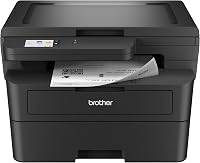
5 Best Budget Laser Printers That Are Worth Buying (October 2026)
The best budget laser printers include the Brother HL-L2405W for a budget printer with a big tray, the HP LaserJet M207dw for two-sided printing on a budget, and the Canon imageCLASS LBP122dw for printing from a phone.
On this page (15 sections)
- The 5 best budget laser printers in detail
- Side by side: budget laser printers by speed, duplex and weight
- How we picked these five budget laser printers
- HL-L2405W or M207dw: which budget printer to buy
- Duplex, Wi-Fi and tray size on a budget printer
- Toner costs after the printer price
- Is a budget laser better than an inkjet?
- What a budget laser printer leaves out
- Setting up a budget laser on your home network
- Speed, toner and paper for a light desk
- Who should skip the budget tier
- Cartridge families across the five
- What we left out
- Which budget printer fits which home
- Which budget laser printer should you buy?
Our first pick for most homes is the Brother HL-L2405W, which pairs wireless printing with a 250-sheet tray.
It prints 30 pages a minute in black and takes Brother's TN830 toner family. The HP LaserJet M207dw comes close, and it suits you better if you want automatic two-sided printing.
A budget laser printer covers most home printing: letters, forms, school papers and recipes, all in black and white. It doesn't dry out between jobs, which makes it a good fit for a printer that sits idle for a few days at a time.
We looked at five models near the lower end of the range. Each one wins on a different trait, so the right pick depends on what you print most.
Our picks at a glance
-
1

-
2

-
3

The 5 best budget laser printers in detail
The HL-L2405W scores highest because it pairs the largest tray here with wireless printing and a simple Brother setup. The HP and Canon models that follow each bring a clear strength, from automatic two-sided printing to phone printing.
Brother HL-L2405W
- 30 pages a minute in black
- 250-sheet paper tray
- Manual duplex
- Brother Mobile Connect app
A Brother with a 250-sheet tray and a manual feed slot for envelopes. Brother's app shows toner levels from a phone, and the warranty is 1 year.
Pros
- 250-sheet tray, the largest here
- Mobile Connect app for printing and toner checks
- Brother backs it with a 1-year limited warranty
Cons
- Two-sided pages need a manual flip
- Heavier than the HP at 15.1 pounds
The HL-L2405W leads this group with a 250-sheet paper tray, more than the M207dw holds. It prints at 30 pages a minute in black, so it's quick for everyday documents.
Duplex is manual on this model, which means you flip the sheet yourself for two-sided pages. A manual feed slot handles envelopes and heavier paper when you need it.
Brother Mobile Connect lets you print from a phone and check toner levels. Brother backs the printer with a 1-year limited warranty, and it says its support covers the life of the printer.
At 15.1 pounds, it's heavier than the M207dw and the LBP122dw, so plan where it will sit before you lift it.
HP LaserJet M207dw
- 28 pages a minute in black
- Automatic duplex as standard
- Dual-band Wi-Fi with a self-reset
- Built-in security features
The budget pick that prints both sides on its own, in a body about 8 inches tall. HP says it suits one to five people, so it fits a small home office.
Pros
- Automatic two-sided printing
- Wi-Fi resets itself after some connection problems, per HP
- Compact enough for a shelf
Cons
- Print only, with no scanner or copier
- The 150-sheet tray holds less than the Brother's 250
The M207dw is the pick here for two-sided printing, because it prints both sides of a page on its own. It runs at 28 pages a minute in black, and HP describes it for a small home office.
Its dual-band Wi-Fi includes a self-reset, which HP says fixes some connection problems without help. That matters most when the printer sits in a corner and gets used only a few times a week.
The tray holds 150 sheets, less than the 250-sheet tray on the Brother. It's print only, so you'll need another machine for scanning and copying.
At 12.4 pounds and about 8 inches tall, it moves easily and fits on a shelf. HP says it suits one to five people.
Canon imageCLASS LBP122dw
- 30 pages a minute in black
- Automatic duplex
- Wireless, print only
- Canon PRINT app for mobile jobs
A wireless duplex laser built around phone printing with Canon's PRINT app. It has no scanner, so it suits a print-only desk.
Pros
- Automatic two-sided printing at 30 pages a minute
- Canon PRINT app and mobile printing
Cons
- Print only, with no scanner or copier
- Its toner is Canon's 071 family, so it doesn't share cartridges with the Brother models
The LBP122dw is built for printing from a phone, with Canon's PRINT app and mobile printing. It prints at 30 pages a minute in black, with automatic duplex, so it covers two-sided work well.
It has no scanner, so it's a print-only machine. Its toner is Canon's 071 family, so it doesn't share cartridges with the Brother models in this guide.
At 12.4 pounds, it weighs the same as the M207dw, but it stands taller at about 14.6 inches. Measure the spot before you order.
HP LaserJet MFP M140w

- 21 pages a minute in black
- Prints, scans and copies
- Wireless and mobile printing
- No automatic duplex
A compact all-in-one that prints, scans and copies in a body about 10 inches deep. HP calls it the smallest laser in its class, which suits a tight desk.
Pros
- Print, scan and copy in a small footprint
- Wireless and mobile printing
Cons
- No automatic duplex, so two-sided work takes more effort
- Slower than the HP and Brother picks at 21 pages a minute
The M140w is the smallest all-in-one in this group, at 10.4 inches deep and 14.2 inches wide. It prints, scans and copies, which makes it useful for a desk that also needs a scanner.
It prints at 21 pages a minute in black, and it has no automatic duplex. That makes it slower than the HP and Brother picks, and two-sided work takes more effort.
HP calls it the smallest laser in its class. That's HP's own claim, and the footprint is the real reason to pick it, since it fits a tight desk.
Canon imageCLASS LBP6030w
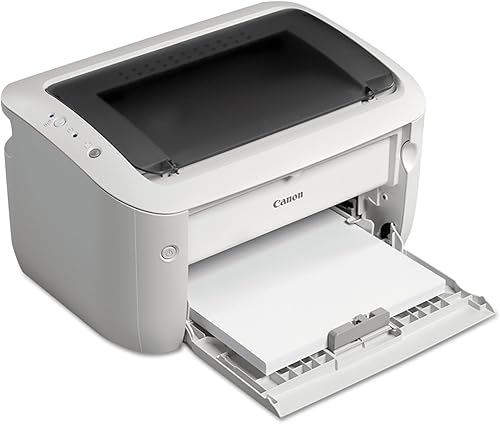
- 19 pages a minute in black
- Print only, wireless
- 150-sheet paper tray
- Under 2 watts in Energy Saver mode, per Canon
The simplest printer here: a compact, print-only wireless laser with a low standby draw. It suits a desk that prints a few pages at a time.
Pros
- Light at 11 pounds and compact
- Canon says it uses under 2 watts in Energy Saver mode
Cons
- Slowest pick here at 19 pages a minute
- No two-sided printing and no scanner
The LBP6030w is the simplest printer here: print only, wireless and compact, at 14.3 inches wide and 11 pounds. It's a good choice when all you need is black and white pages from a single machine.
It prints 19 pages a minute in black, the slowest in this group, and it doesn't do two-sided printing. The tray holds 150 sheets.
Canon says the printer uses less than 2 watts in Energy Saver mode, which keeps the standby draw low for a printer that waits between jobs. Its toner is Canon's 125 cartridge, rated at 1,600 pages.
Side by side: budget laser printers by speed, duplex and weight
Speed runs from 19 to 30 pages a minute across the five, so the duplex setting and the weight often decide the choice. Two print both sides on their own, one needs a manual flip, and two don't duplex at all.
| Product | Best for | Print speed | Duplex | Weight | Our score |
|---|---|---|---|---|---|
| Brother HL-L2405W | a budget printer with a big tray | 30 pages a minute, black | Manual | 15.1 lb | 8.2 |
| HP LaserJet M207dw | two-sided printing on a budget | 28 pages a minute, black | Automatic | 12.4 lb | 7.8 |
| Canon imageCLASS LBP122dw | printing from a phone | 30 pages a minute, black | Automatic | 12.4 lb | 7.7 |
| HP LaserJet MFP M140w | a small all-in-one on a tight desk | 21 pages a minute, black | No | 11.9 lb | 7.3 |
| Canon imageCLASS LBP6030w | a single-task print station | 19 pages a minute, black | No | 11 lb | 6.9 |
The lightest pick is the Canon LBP6030w at 11 pounds, and the heaviest is the HL-L2405W at 15.1 pounds. Measure the desk before you choose, since the difference matters on a small shelf.
How we picked these five budget laser printers
We compared the print speed, duplex, Wi-Fi, paper tray and weight for each model. We also checked the toner family and cartridge yield, since they set the running cost after the printer price.
Our score weighs specs, features and buyer feedback against what you're shopping for. Scores run from 1 to 10, and a higher score means a better fit for a budget home buyer.
Here's how the five landed:
- Brother HL-L2405W, 8.2: the largest tray here, with manual duplex.
- HP M207dw, 7.8: automatic duplex and Wi-Fi, with a smaller tray.
- Canon LBP122dw, 7.7: automatic duplex and phone printing, but print only.
- HP M140w, 7.3: a scanner and copier in a compact body, with no duplex.
- Canon LBP6030w, 6.9: the simplest print-only model, and the slowest here.
HL-L2405W or M207dw: which budget printer to buy
Buy the Brother HL-L2405W if you print mostly one side and want a 250-sheet tray, and the HP M207dw if you print two-sided pages often. The HL-L2405W needs you to flip two-sided pages by hand, while the M207dw does it on its own.
The HL-L2405W scores higher because it holds 250 sheets against 150 and takes Brother's TN830 toner in standard and high-yield sizes. The M207dw is 2.7 pounds lighter and the better fit for long reports.
Our HL-L2405W review covers the Brother in full.
Duplex, Wi-Fi and tray size on a budget printer
Automatic duplex saves paper and time. Two of the five print both sides on their own, the HP M207dw and the Canon LBP122dw, while the Brother HL-L2405W needs a manual flip.
Wi-Fi works in all five, but the apps differ. Brother's Mobile Connect tracks toner use from a phone, and Canon's PRINT app handles mobile jobs on the LBP122dw.
Tray size sets how often you refill. The Brother HL-L2405W holds 250 sheets, and the HP M207dw and the Canon LBP6030w hold 150.
Toner costs after the printer price
A budget printer can still cost more over time, because the toner sets the running cost. Check each cartridge's yield before you buy, since a cheap printer with costly cartridges can end up pricier than a model with a better toner family.
The Canon LBP6030w uses a cartridge rated at 1,600 pages, and the Brother HL-L2405W uses the TN-830 family, rated at up to 1,200 pages for the standard cartridge and up to 3,000 for the high-yield one. Our laser printer cost per page guide shows how to work out the numbers.
If you buy a Brother, the Brother toner guide explains which code fits which model.
Is a budget laser better than an inkjet?
For black and white documents, a laser usually wins on speed, and it doesn't dry out between jobs. For photos and mixed color work, an inkjet is the better tool.
Our laser vs inkjet guide for home use lays out the full trade-off. If you want more models to compare, the pillar guide covers the strongest picks across the range.
What a budget laser printer leaves out
A budget model keeps the basics and drops the extras. Most of these printers have no color, no fax and no large paper trays, so the cuts are clear.
That's fine for a desk that prints black and white pages. It's a weaker fit for a home that scans contracts, prints color or needs a stack of paper ready all week.
Check each feature you use every week, and pay only for the ones you'll use. Anything you'll never touch is money better spent elsewhere.
Setting up a budget laser on your home network
Most budget lasers connect over Wi-Fi, and setup usually starts from the printer's panel or its app. Have the Wi-Fi name and password ready, since the printer will ask for both.
Put the printer close to the router for the first setup, then move it once it's online. Weak signal is a common cause of dropped connections, so the spot matters as much as the model.
Note the printer's network address once setup is done. You'll need it the first time a laptop or phone can't find the printer.
Speed, toner and paper for a light desk
A rating of 19 to 30 pages a minute is fast enough for everyday documents at home. Speed matters more when you print long reports or stacks of forms.
Toner adds up over time, so check each cartridge's yield before you choose. The Canon LBP6030w and the Brother HL-L2405W use different cartridge families, so compare the codes as well as the price per page.
Our laser printer cost per page guide shows how to compare two printers on the same math, even when their cartridges differ.
Who should skip the budget tier
Skip the budget tier if you print in color, scan often or need a big tray. The step up to a mid-range model adds those features.
If you work from home or run a small business, the best laser printer for a home office and best laser printer for a small home business roundups are the better starting points.
Cartridge families across the five
Which budget laser printer uses which cartridge
The HL-L2405W takes the TN-830 family, and the two Canon models each use their own cartridge code. The HP models use their own codes as well, so the families don't overlap.
Check the model name against the cartridge box, not the brand name alone. Our Brother toner guide shows how the codes line up for the Brother models.
What we left out
We left out models whose specs we couldn't confirm, and we didn't score a printer on a feature the maker doesn't state. That keeps the list to printers we could compare on the same facts.
The result is a short list that covers the common jobs, from a plain desk printer to a compact all-in-one.
Which budget printer fits which home
- A simple wireless desk printer: the Brother HL-L2405W, with a 250-sheet tray and the TN-830 toner family.
- A shared desk that prints two sides: the HP LaserJet M207dw, with automatic duplex and Wi-Fi that resets itself.
- Phone-first printing: the Canon LBP122dw, with the Canon PRINT app and automatic duplex.
- A small desk that also scans: the HP LaserJet MFP M140w, with print, scan and copy in a compact body.
- A single print-only station: the Canon LBP6030w, the simplest and slowest pick here.
Start from the list above rather than the score alone. The job you do most often should decide the pick.
Which budget laser printer should you buy?
Pick the Brother HL-L2405W if you want a 250-sheet tray and the Brother toner family. Pick the HP M207dw if two-sided printing and Wi-Fi matter most.
Pick the Canon LBP122dw for printing from a phone with duplex, the HP M140w if a scanner matters more, and the Canon LBP6030w for a simple print-only desk. If the printer also needs to scan and copy regularly, the best laser printer for a home office roundup covers the bigger all-in-ones.
Our top 3 picks at a glance
-
1
-
2
-
3
Frequently asked questions
What is the best budget laser printer for a home?
For most homes, the Brother HL-L2405W is the best budget pick, because it pairs wireless printing with a 250-sheet tray. If you want automatic two-sided printing, the HP LaserJet M207dw is the close second.
Is a budget laser printer worth buying over an inkjet?
For black and white documents, a laser prints quickly and doesn't dry out between jobs. If you print mostly photos, an inkjet is the better tool, and our laser vs inkjet guide explains the trade-off.
Do budget laser printers print two-sided pages?
Some do, and some don't. The HP M207dw and the Canon LBP122dw print both sides on their own, while the HL-L2405W needs a manual flip and the LBP6030w and M140w don't duplex.
What should I check before buying a budget laser printer?
Check the duplex setting, the paper tray size and the toner family. The toner family sets your running cost, so compare the cartridge yield before you buy the printer.