Brother vs HP Laser Printer: Which Brand for Home? (October 2026)
For most home offices, a Brother laser printer such as the DCP-L2640DW is the stronger pick, because it prints two-sided at 36 pages a minute and copies from a feeder. HP's LaserJet MFP M140w suits a small desk where a compact body matters more than speed.
On this page (20 sections)
- Brother vs HP laser printer: which is faster and two-sided
- Which one fits a smaller desk
- Scanning, copying and ID cards
- Toner and cartridge rules on each brand
- Wi-Fi, USB and phone printing
- Is Brother a good printer brand for home?
- Is HP a good laser printer brand for home?
- Problems to check on either brand
- HP also makes two-sided models
- Specs side by side
- Who should choose Brother
- Who should choose HP
- Trade-offs at a glance
- Setup and phone printing in practice
- Warranty and support
- Questions people ask about the two brands
- Desk and room checks before you buy
- What the cartridges mean for running costs
- Which brand fits a home office and which fits a home desk
- Brother vs HP laser printer: which to choose for your home
For most home offices a Brother such as the DCP-L2640DW is the stronger pick, and HP's compact M140w suits a small desk. Their models differ more by feature than by brand, so this page compares one model from each side and then answers the brand questions people ask most.
The Brother DCP-L2640DW and the HP LaserJet MFP M140w make a fair pair, because both copy and scan from one body.
 Best Brother for copying, scanning and two-sided printing
Brother DCP-L2640DW

Brother vs HP laser printer: which is faster and two-sided
The Brother DCP-L2640DW is quicker on paper. Brother rates it at 36 pages a minute in black and white, with automatic two-sided printing.
HP says the M140w prints up to 21 black-and-white pages a minute, single-sided. A two-sided job takes more time on the HP, because you flip each sheet by hand.
Brother vs HP laser printer on the first page
Brother rates the DCP-L2640DW's first page at about 8.5 seconds. HP says the M140w's first page takes about 8.3 seconds.
The two are close on the first page, so the gap shows up over longer jobs. Speed across a long report favors the Brother.
Which one fits a smaller desk
The HP M140w is the compact one. It measures 14.2 inches wide, 10.4 inches deep and 7.8 inches tall, and it weighs 11.9 pounds.
The Brother is 16.1 inches wide, 15.7 inches deep and 12.5 inches tall, and it weighs 25 pounds. That's a bigger footprint, so measure before you order.
Where the HP M140w fits better
A corner desk with a clear 14-inch-wide space is a good match for the M140w. It fits a shelf that wouldn't take the Brother's depth and height.
If your space is wider and deeper, the Brother fits, and its feeder and two-sided printing are worth the extra room.
Scanning, copying and ID cards
The Brother DCP-L2640DW has a 50-page automatic document feeder for stacks. You load a set of pages and let the printer copy or scan them.
HP says the M140w can copy both sides of an ID card onto one side of one sheet. That's a handy trick for small documents, though it's not the same as a feeder.
Toner and cartridge rules on each brand
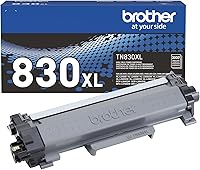
The Brother DCP-L2640DW uses TN830-series toner and a separate DR830 drum unit. You buy the drum on its own schedule, so keep the model codes handy when you reorder.
The HP ships with a starter cartridge, which usually prints fewer pages than a standard replacement. Plan for a full cartridge early on.
HP also says the M140w works only with cartridges that carry original HP chips, and that it blocks cartridges with non-HP chips. Check that rule before you buy a replacement.
If you're comparing supplies with a Brother, read the Brother toner guide for that side of the choice.
Wi-Fi, USB and phone printing
The Brother connects over dual-band Wi-Fi, Ethernet and USB, and it works with the Brother Mobile Connect app. The HP connects over Wi-Fi and USB 2.0, and it uses the HP Smart app.
HP says the M140w supports AirPrint and Mopria, so many phones and tablets can print to it directly.
Is Brother a good printer brand for home?
Brother lists a 1-year limited warranty on the DCP-L2640DW, with free online, call and live chat support for the life of the printer. That's a clear support promise to weigh.
We can't judge long-term reliability from specs alone. Read the best Brother laser printer guide for how the Brother models compare as a set.
Is HP a good laser printer brand for home?
HP sells its compact laser printers for small teams, and the M140w fits that use with copy, scan and wireless printing in a small body. HP suits it to one to three people.
HP sets its own warranty terms for the M140w, so confirm them before you buy. The HP website is the place to check.
Problems to check on either brand
Two areas need care on either brand: Wi-Fi setup and cartridge messages. Keep the router name and password ready before you start setup.
Read the cartridge rules on each side before you buy supplies, since they decide what you can use later. For how a laser prints and where the toner and drum fit, see how a laser printer works.
HP also makes two-sided models
The M140w is HP's compact single-sided model, so it isn't the whole HP story. HP's LaserJet M207dw prints on both sides automatically, with dual-band Wi-Fi and Ethernet.
Our black and white laser printer guide ranks it next to the Brothers. It scores below the four Brothers there, but it's the two-sided HP to look at if you prefer HP.
Specs side by side
The table below compares speed, duplex and body size for the two models.
| Product | Best for | Print speed | Duplex | Size (W x D x H) | Our score |
|---|---|---|---|---|---|
| Brother DCP-L2640DW | Brother for copying, scanning and two-sided printing | 36 pages a minute | Automatic | 16.1 x 15.7 x 12.5 in | 8.6 |
| HP LaserJet MFP M140w | a compact HP on a small desk | 21 pages a minute | No | 14.2 x 10.4 x 7.8 in | 7.3 |
Who should choose Brother
Choose Brother if your printing includes two-sided pages, stacks of paper or copy and scan. The DCP-L2640DW covers all three at 36 pages a minute.
Brother also suits a home office that wants Ethernet as well as Wi-Fi. For a print-only desk, the HL-L2460DW covers the core job without the extra parts.
Who should choose HP
Choose HP if the desk is small and most pages are one side. The M140w's compact body is its main strength.
HP also suits a home where copy, scan and ID card copying matter more than speed. For the HP's own details, read the HP LaserJet MFP M140w review.
Trade-offs at a glance
- Speed: the DCP-L2640DW is faster, at 36 pages a minute against 21.
- Two-sided printing: built in on the Brother, manual flipping on the HP.
- Desk size: the M140w is the smaller printer.
- Cartridges: Brother uses the TN830 family, while HP's cartridges need original HP chips.
If you're weighing the DCP-L2640DW against the touchscreen model, the DCP-L2640DW vs HL-L2480DW comparison covers that choice.
Setup and phone printing in practice
Both printers set up over Wi-Fi with a companion app. The Brother uses the Brother Mobile Connect app, and the HP uses the HP Smart app.
Print a test page from your phone before you rely on it. That tells you the phone and the printer can reach each other on the same network.
Warranty and support
Brother lists a 1-year limited warranty on the DCP-L2640DW, with free online, call and live chat support for the life of the printer. HP sets its own warranty terms for the M140w, so check them before you buy.
Questions people ask about the two brands
Is Brother more reliable than HP? The specs on this page can't show that, so check independent reviews and warranty terms before you decide.
Which is easier to restock? Brother's TN830 family covers standard and high-yield cartridges, while the M140w uses its own HP cartridges under the chip rule.
Desk and room checks before you buy
Measure the spot first. The DCP-L2640DW needs a wider and deeper space than the M140w, and its 12.5-inch height matters under a shelf.
Check the outlet and the Wi-Fi signal at the spot you pick as well. Both printers need a power outlet and a steady connection to your network.
What the cartridges mean for running costs
Brother's TN830 family gives you standard and high-yield choices, so you can match the cartridge to how much you print. HP's M140w uses its own cartridges, and HP's chip rule limits what you can use.
Compare cartridge prices for the model you pick before you buy, since supplies drive most of the running cost over time.
Which brand fits a home office and which fits a home desk
A home office that prints, copies and scans every day fits the Brother DCP-L2640DW. A small home desk that prints one side at a time and wants a compact body fits the HP M140w.
If your office needs two-sided printing, the Brother is the one of the two that does it automatically.
Brother vs HP laser printer: which to choose for your home
Choose Brother if you print two-sided pages, copy stacks or want the faster machine. Choose HP if the desk is small and you print one side at a time.
Both are laser printers, so the brand choice comes down to speed, desk size and the cartridge rules you're willing to live with.
Frequently asked questions
Is Brother or HP the better laser printer brand for home?
For a home office that prints two-sided pages and copies stacks, Brother is the stronger pick in this comparison. For a small desk with one to three people and mostly one-sided printing, the HP M140w is the more compact choice.
Which is faster, a Brother or an HP?
Brother rates the DCP-L2640DW at 36 pages a minute in black and white, with automatic two-sided printing. HP says the M140w prints up to 21 black-and-white pages a minute, single-sided.
Do HP and Brother printers use the same toner?
No, the DCP-L2640DW uses TN830-series toner and a DR830 drum, while the M140w uses its own HP cartridges. HP says the M140w works only with cartridges that carry original HP chips.
Which brand is easier to print from a phone?
Both support phone printing. The Brother works with the Brother Mobile Connect app, and the HP M140w supports AirPrint and Mopria, so many phones and tablets can print to it directly.